
Reviews & Guides · Computing & Networking
ASUS RT-AX86U Pro and RT-AX82U: wireless AiMesh for a weak bedroom signal
Reviewed: ASUS RT-AX86U Pro, ASUS RT-AX82URegional reference: ASUS RT-AX86U Pro (US); ASUS RT-AX82U (Global / Europe reference)
I added an RT-AX86U Pro as my main router and used my RT-AX82U as a wireless AiMesh node; gaming and livestreaming stayed connected.
I already had an ASUS “Devilfish” router in the living room. Wi-Fi worked without any problems across about 70% of my home, but the main bedroom was two walls away, and the signal by the bed was weak. I’d lose the connection just by turning over. I considered using ASUS AiMesh. Online guides said wired backhaul was best, but I couldn’t run a cable, so I decided to try wireless backhaul and switch to another solution if it didn’t work. I bought a second-hand “Megalodon” router, making it an ocean-themed family. I set the Megalodon up as the main router and the Devilfish as the node, with wireless backhaul. It took me half a day to get everything set up. I tested stability and roaming with Speedtest and Wi-Fi Magic Box, and it seemed pretty good: the main and node switched smoothly, and gaming and livestreaming stayed connected. I had 5 GHz Wi-Fi throughout the home—great!
Source: 一日看尽长安花 · Xiaohongshu · 2025-09-17 · 华硕路由器aimesh 无线回程. Search this Chinese title in Xiaohongshu to find the original post.
Before You Buy
Models in your region
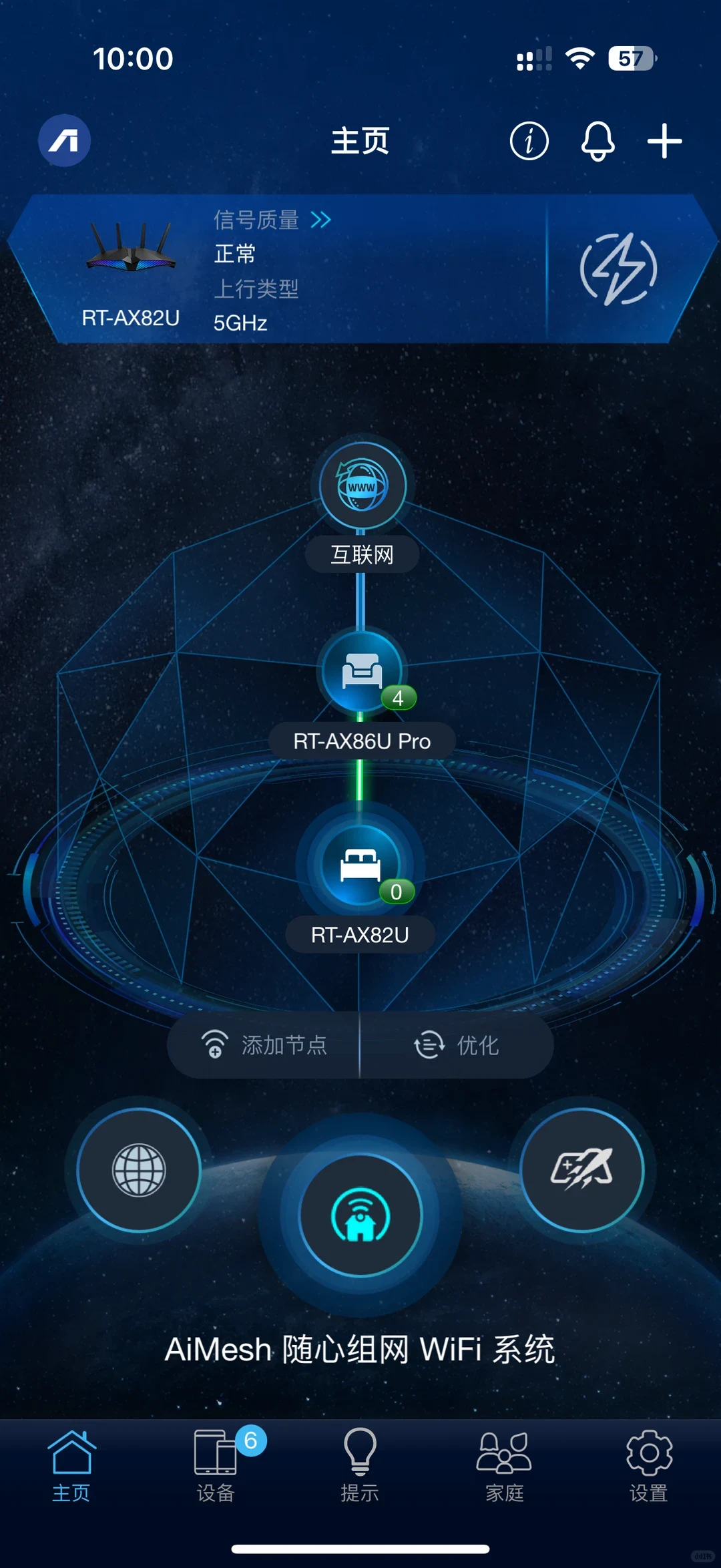
The owner’s app identifies the routers as the ASUS RT-AX86U Pro (main) and RT-AX82U (node). The official US RT-AX86U Pro and global/Europe RT-AX82U references identify those model families, but the owner’s exact China-market hardware and firmware SKUs are not shown; regional firmware compatibility is not established by this account.
| Model in this review | Related regional model | What to know |
|---|---|---|
| ASUS RT-AX86U Pro | ASUS RT-AX86U Pro (US) | The official US reference is the same RT-AX86U Pro family named in the owner’s app. It is a dual-band Wi-Fi 6 AiMesh router with a 2.5G port usable for WAN or LAN; the owner used the China-market unit as the main router, but its exact SKU and firmware are unknown. |
| ASUS RT-AX82U | ASUS RT-AX82U (Global / Europe reference) | The official global/Europe reference identifies the RT-AX82U family, not the V2. The owner’s app shows an RT-AX82U as the node, but its exact regional SKU and firmware are unknown, so this account does not establish compatibility across all regional versions. |
- Model in this review
- ASUS RT-AX86U Pro
- Related regional model
- ASUS RT-AX86U Pro (US)
- What to know
- The official US reference is the same RT-AX86U Pro family named in the owner’s app. It is a dual-band Wi-Fi 6 AiMesh router with a 2.5G port usable for WAN or LAN; the owner used the China-market unit as the main router, but its exact SKU and firmware are unknown.
- Model in this review
- ASUS RT-AX82U
- Related regional model
- ASUS RT-AX82U (Global / Europe reference)
- What to know
- The official global/Europe reference identifies the RT-AX82U family, not the V2. The owner’s app shows an RT-AX82U as the node, but its exact regional SKU and firmware are unknown, so this account does not establish compatibility across all regional versions.
What the wireless AiMesh setup showed
Wireless AiMesh worked in this home without Ethernet backhaul: the RT-AX86U Pro served as the main router and RT-AX82U as the node, with smooth switching and no reported dropouts during gaming or livestreaming. No controlled comparison with wired backhaul was made, and other layouts may behave differently.
The reported whole-home 5 GHz coverage is the owner’s impression, not the result of a measured RF survey. The app screenshot shows the RT-AX82U node connected with a normal 5 GHz link at that snapshot; it does not show throughput or prove signal quality in every room.
What to check before matching regional routers
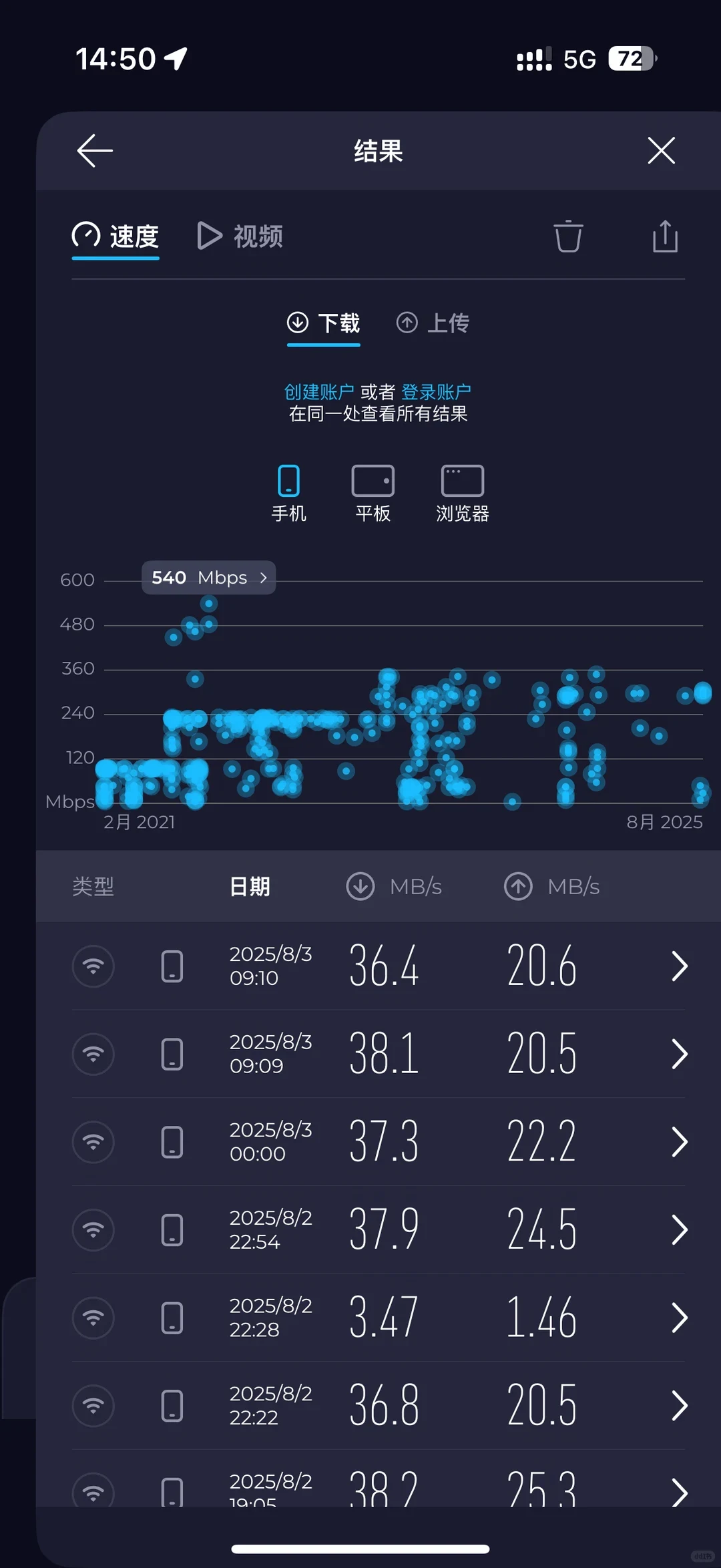
The official references identify the RT-AX86U Pro as a dual-band Wi-Fi 6 AiMesh model with a 2.5G port that can serve as WAN or LAN, and the RT-AX82U as a dual-band AX5400 Wi-Fi 6 AiMesh family. Those published specifications do not establish the connection speeds: the post does not identify a controlled test or attribute particular Speedtest results to this newly configured mesh.
The app identifies the node as RT-AX82U, but the regional SKU and firmware are not shown, and the supplied evidence does not verify interoperability between the China-market units and other regions’ firmware. If buying routers from different markets, check compatibility for the exact models and firmware before relying on this setup experience.
The speed-history image spans February 2021 to August 2025, so it is not a before-and-after test of the mesh described in the September 2025 post. Its selected point is 540 Mbps; the table’s recent entries are in MB/s, not Mbps. Neither should be treated as proof of the new setup’s throughput.
Related Reading

Reviews & Guides · Computing & Networking
TP-Link Deco X55 in a two-storey Australian home: Wi-Fi across 300 m²
I installed two TP-Link Deco X55 units in my 300 m², two-storey home; bedrooms that often lost Wi-Fi now had a signal throughout the house.
Reviews & Guides · Computing & Networking
TP-Link Deco X55: DNS pauses stopped for six days in access-point mode
I switched my Deco X55 to access-point mode and restored my older router to the front of the network. The DNS-like pauses stayed away for six days.
Reviews & Guides · Computing & Networking
TP-Link Deco X55 after nearly a year: six units, Teams and gaming
I’ve used six TP-Link Deco X55 units for nearly a year, including daily Teams calls and online gaming; I’ve had only one or two connectivity issues.