
Reviews & Guides · Computing & Networking
ASUS RT-BE88U after 44 days: Mac backups and steady uptime
Reviewed: ASUS RT-BE88URegional reference: ASUS RT-BE88U (US)
I used my ASUS RT-BE88U for Mac Time Machine backups and logged 44 days of uptime; after a firmware update broke ASUS DDNS, I switched to DDNS-GO.
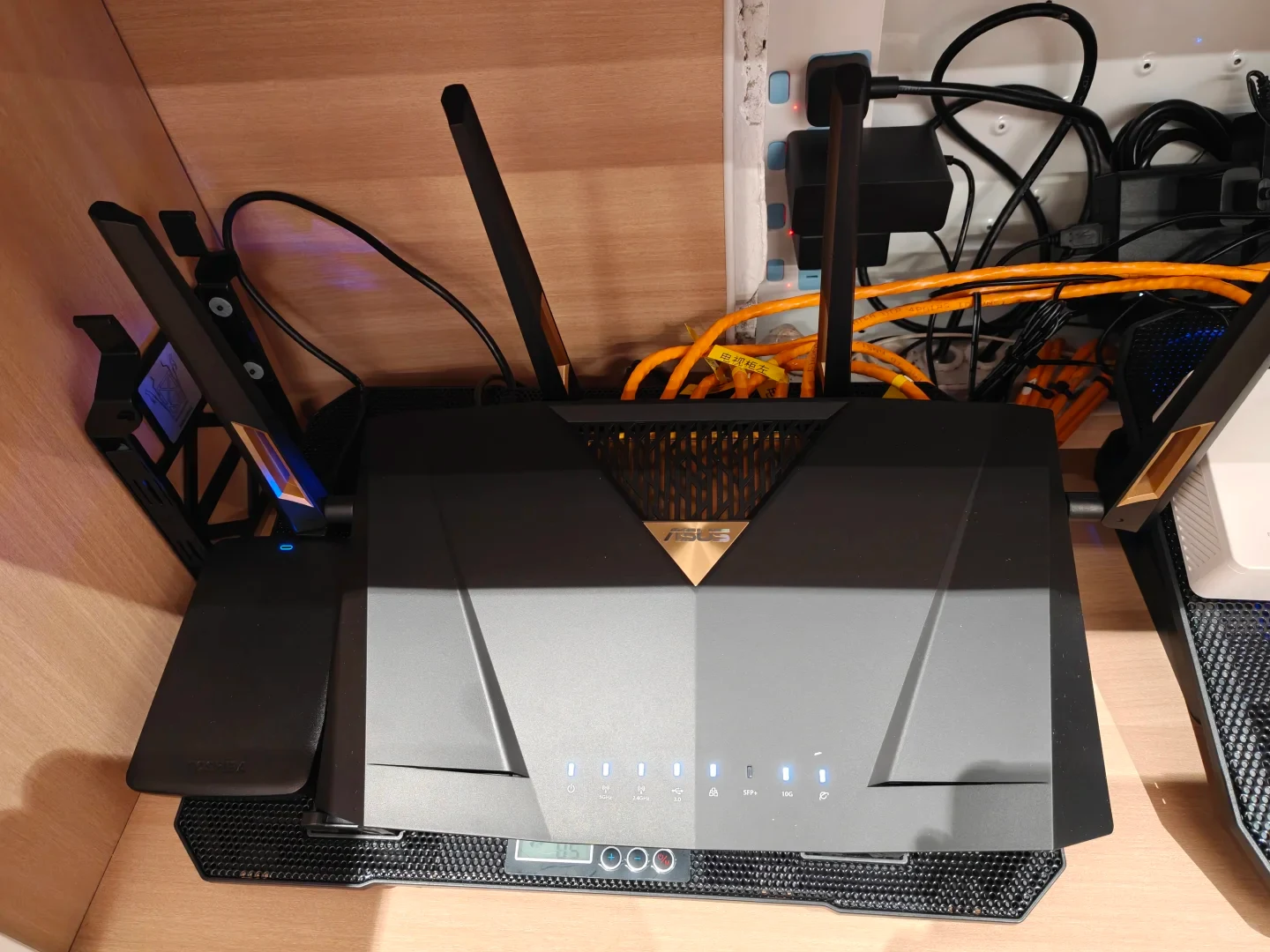
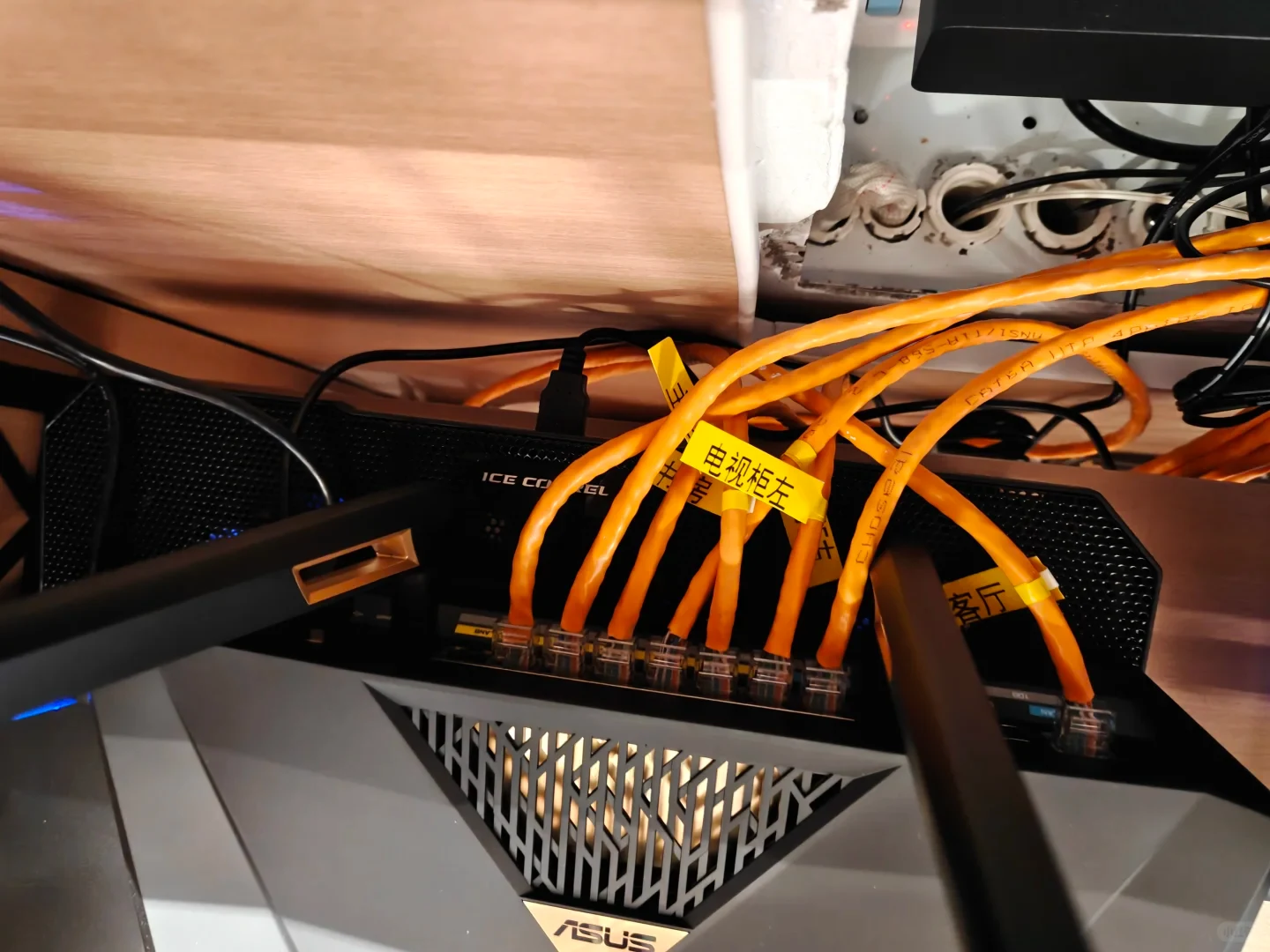
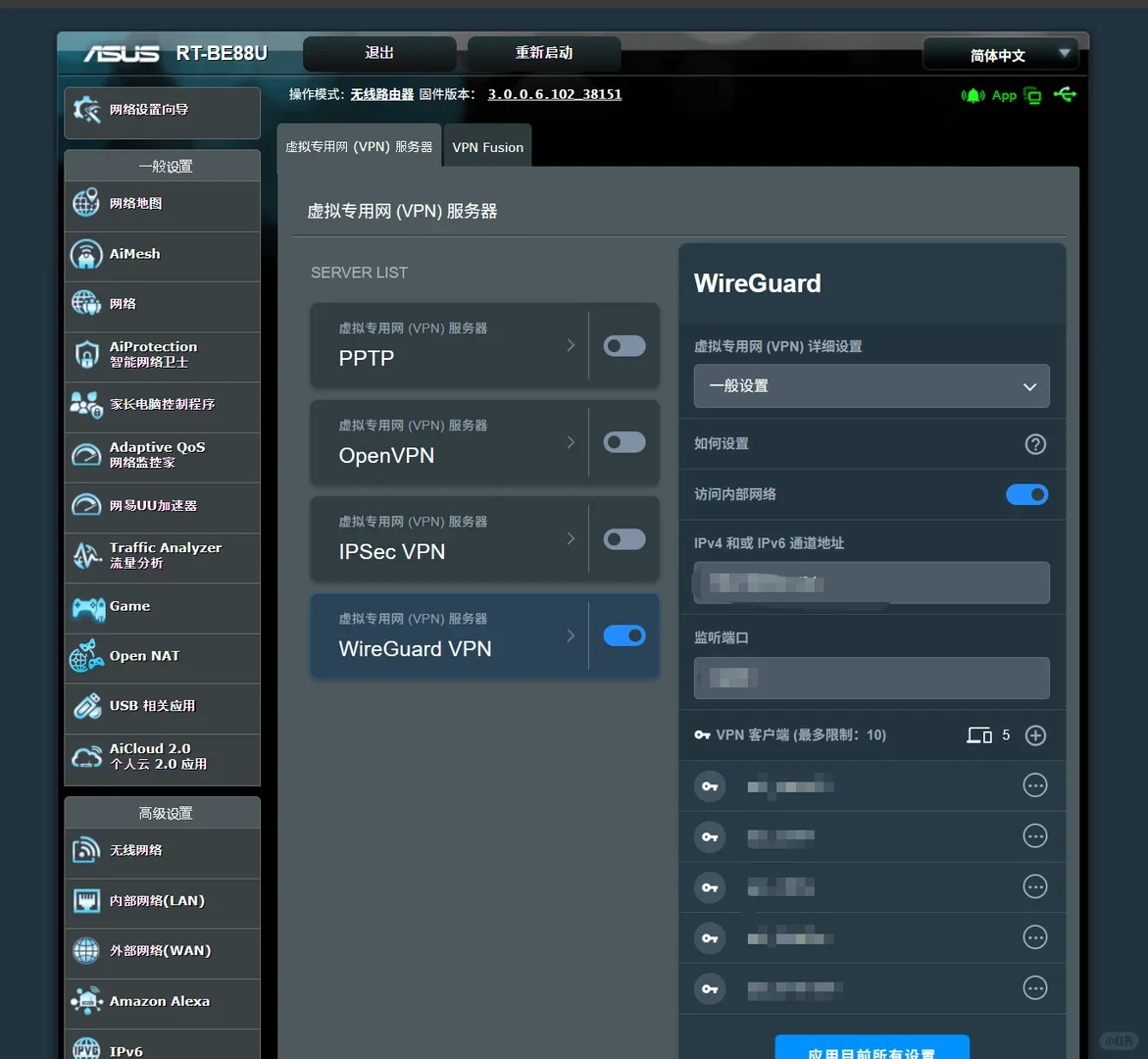
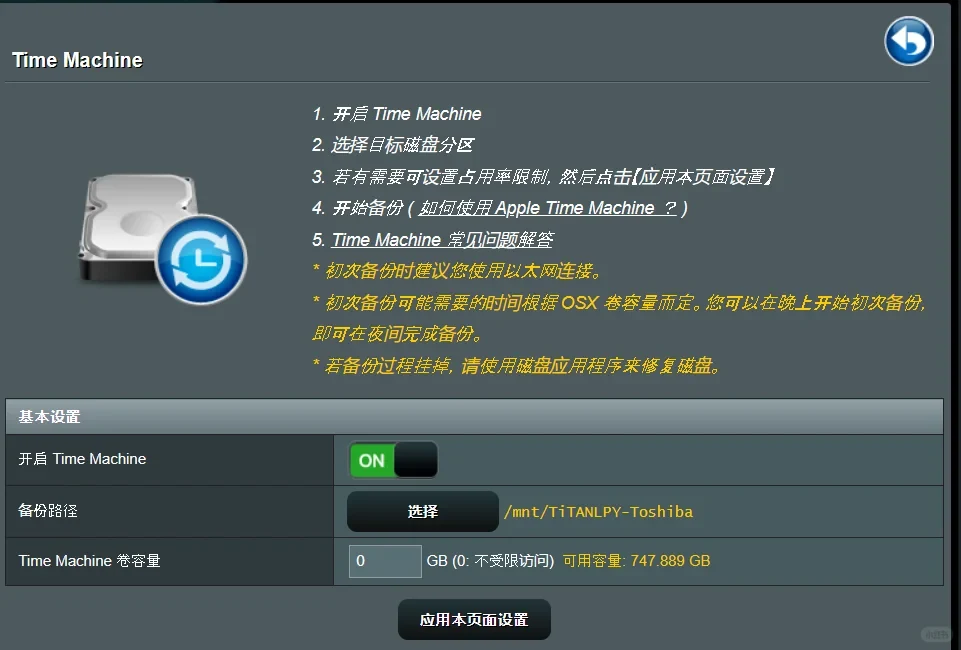
I bought the ASUS BE88U during last year’s Singles’ Day sale, mainly because it has so many ports and could save me from buying a switch. Having all those Ethernet ports is so satisfying! Here’s what stands out most from using it:
Unbeatable signal coverage! 📶
The signal is incredibly strong! I changed the region setting to Australia, and coverage around the house has been great. Later, I added an ASUS TUF small whirlwind router to make an AiMesh network. ASUS AiMesh is so convenient—it was basically a one-click setup, easy even for a beginner. You can adjust the signal threshold freely, which is great for people who like to tinker! 👍
The firmware is rock solid! 🔒
The Mac in my home acts as the gateway and DHCP server, so I’ve always kept the router on its stock firmware. It seems there are now modified official and Merlin firmware options too.
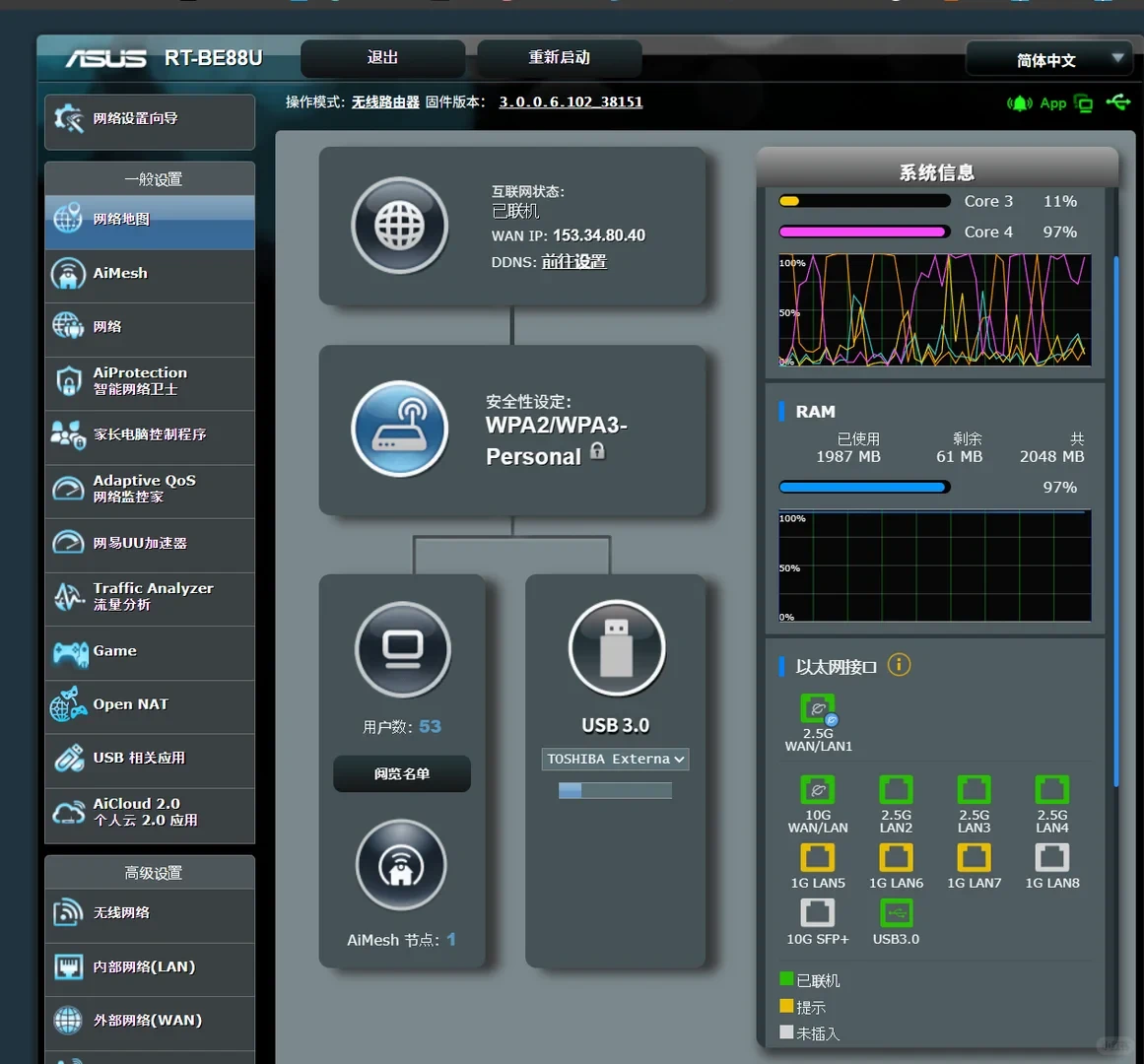
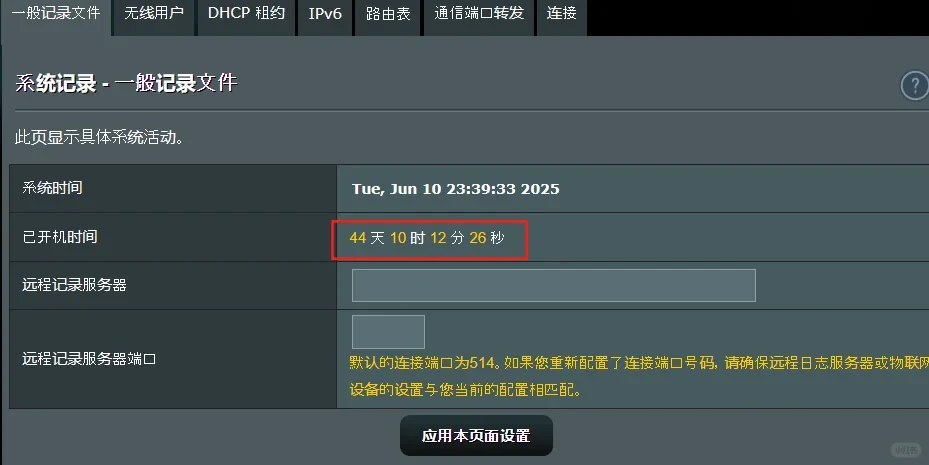
The stability is excellent. It ran continuously for more than a month without a restart; my previous routers needed scheduled reboots, but this BE88U has had no problems. That 2 GB of memory is a real strength! 💪
One small disappointment: the old firmware’s built-in DDNS could use asuscomm.com, but that stopped working after an update. No problem—I set up DDNS-GO on my home server, and that solved it perfectly. 👌
✨ WireGuard is built into the firmware, making it easy to set up a VPN so I can securely access my home network while I’m away.
The USB 3.0 port has quite a few uses. With stock firmware, I use the router as a Time Machine server, which makes backing up my Mac really convenient! The memory display in image 3 looks full because of this, but it hasn’t affected performance in my use, so I don’t worry about it.
One 10G SFP+, one 10G, four 2.5G, and four 1G ports—10 ports in total. That’s fantastic! [Praise]
Source: PureSnow · Xiaohongshu · 2025-06-11 · 华硕BE88U真的顶. Search this Chinese title in Xiaohongshu to find the original post.
Before You Buy
Models in your region
PureSnow’s review concerns an ASUS BE88U, identified by the supplied evidence as the RT-BE88U family. ASUS’s US specification page lists the same named regional model. The owner’s experience is with stock firmware in wireless-router mode, using an Australia region setting; it does not establish identical regional firmware, wireless channels, or results for every setup.
| Model in this review | Related regional model | What to know |
|---|---|---|
| ASUS BE88U (RT-BE88U family; source unit) | ASUS RT-BE88U (US) | The US listing identifies the same RT-BE88U model family. It specifies dual-band Wi-Fi 7, 2 GB RAM, one 10 Gbps WAN/LAN port, one 10 Gbps SFP+ port, four 2.5 Gbps and four Gigabit RJ45 ports, plus USB 3.2 Gen 1. Regional firmware and wireless-channel behavior are not established as identical; the review’s Australia region setting is one owner’s setup. |
- Model in this review
- ASUS BE88U (RT-BE88U family; source unit)
- Related regional model
- ASUS RT-BE88U (US)
- What to know
- The US listing identifies the same RT-BE88U model family. It specifies dual-band Wi-Fi 7, 2 GB RAM, one 10 Gbps WAN/LAN port, one 10 Gbps SFP+ port, four 2.5 Gbps and four Gigabit RJ45 ports, plus USB 3.2 Gen 1. Regional firmware and wireless-channel behavior are not established as identical; the review’s Australia region setting is one owner’s setup.
Ports and wired connections
The RT-BE88U offers ten wired connections without a separate switch: one 10 Gbps WAN/LAN port, one 10 Gbps SFP+ port, four 2.5 Gbps RJ45 ports, and four Gigabit RJ45 ports. That layout matches the owner’s reason for choosing the router, but the source does not report measured transfer speeds.
Mac backups and memory use
The US RT-BE88U specification lists Time Machine among the USB applications. The owner used the stock firmware and a USB-connected drive for Mac backups, and said the high memory reading did not affect performance in that setup. The account does not establish backup speed or long-term reliability for other drives and networks.
VPN and remote access
The RT-BE88U’s listed VPN options include a WireGuard server and client. The owner used the built-in WireGuard feature to access the home network while away; the supplied account does not measure connection speed or describe its security configuration, so those results should not be assumed for every setup.
DDNS after firmware updates
The US specification lists DDNS support, but that does not confirm that every address provider or firmware version works the same way. After an update stopped the owner’s previous asuscomm.com setup, they ran DDNS-GO on a home server instead. If DDNS is essential, check the current firmware and your intended provider before relying on a particular address.
AiMesh and coverage
The RT-BE88U supports AiMesh, and the owner described adding an ASUS TUF node with a simple setup and adjustable signal thresholds. They also reported strong coverage after changing the router’s region setting to Australia, but this personal result is not a general regional recommendation or a controlled coverage test.
Related Reading

Reviews & Guides · Computing & Networking
TP-Link Deco X55 in a two-storey Australian home: Wi-Fi across 300 m²
I installed two TP-Link Deco X55 units in my 300 m², two-storey home; bedrooms that often lost Wi-Fi now had a signal throughout the house.
Reviews & Guides · Computing & Networking
TP-Link Deco X55: DNS pauses stopped for six days in access-point mode
I switched my Deco X55 to access-point mode and restored my older router to the front of the network. The DNS-like pauses stayed away for six days.
Reviews & Guides · Computing & Networking
TP-Link Deco X55 after nearly a year: six units, Teams and gaming
I’ve used six TP-Link Deco X55 units for nearly a year, including daily Teams calls and online gaming; I’ve had only one or two connectivity issues.