
Reviews & Guides · Computing & Networking
ZTE BE5100 Pro+ mesh roaming: 7 Mbps link, 2,000+ Mbps after reconnect
Reviewed: ZTE Xuntian BE5100 Pro+, ZTE Qingtian AX3000Regional reference: ZTE AX3000 Pro (UK and Europe)
I saw my phone negotiate a 7 Mbps link while roaming to the ZTE mesh secondary router; reconnecting directly brought the rate above 2,000 Mbps.
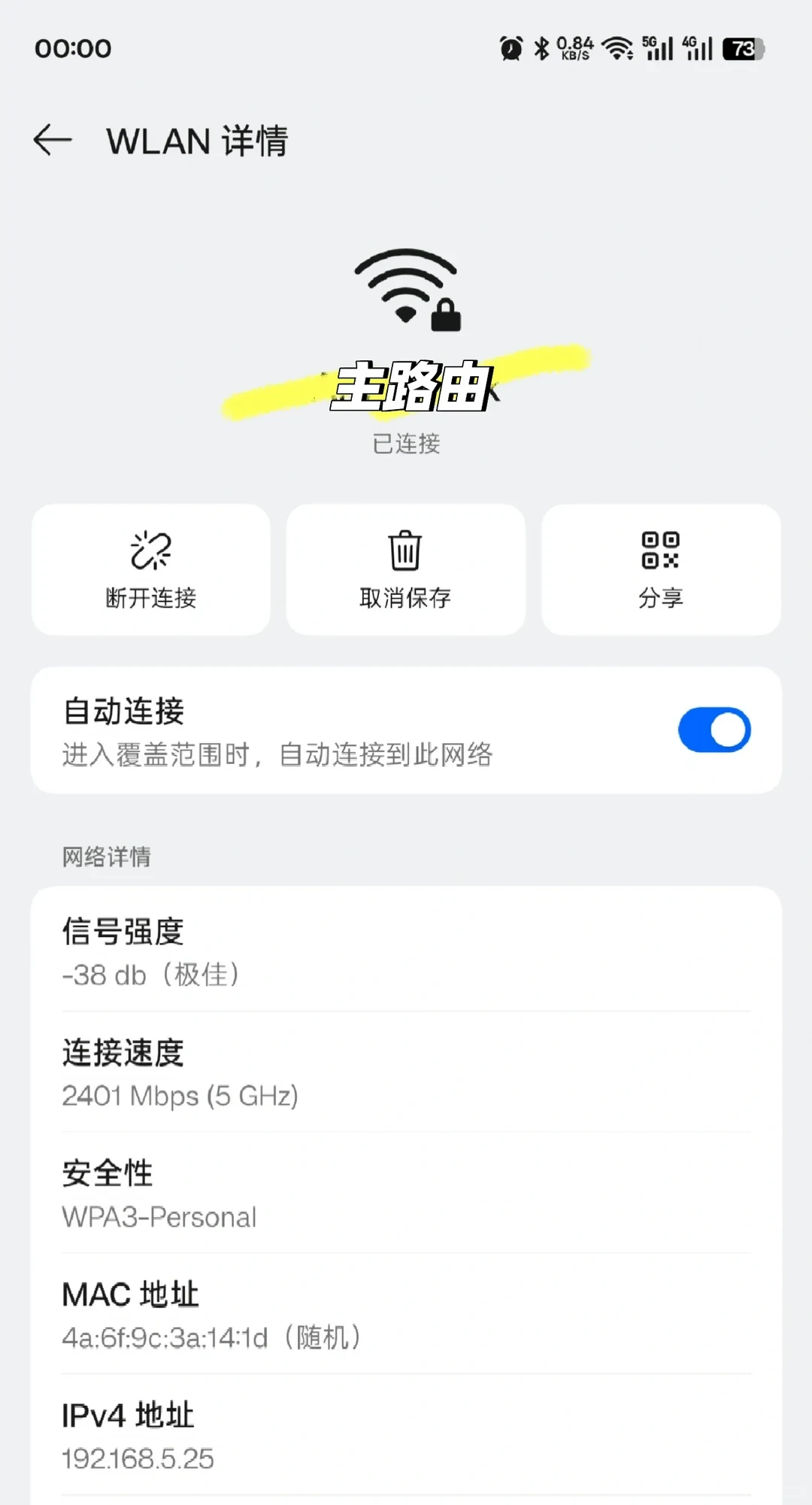
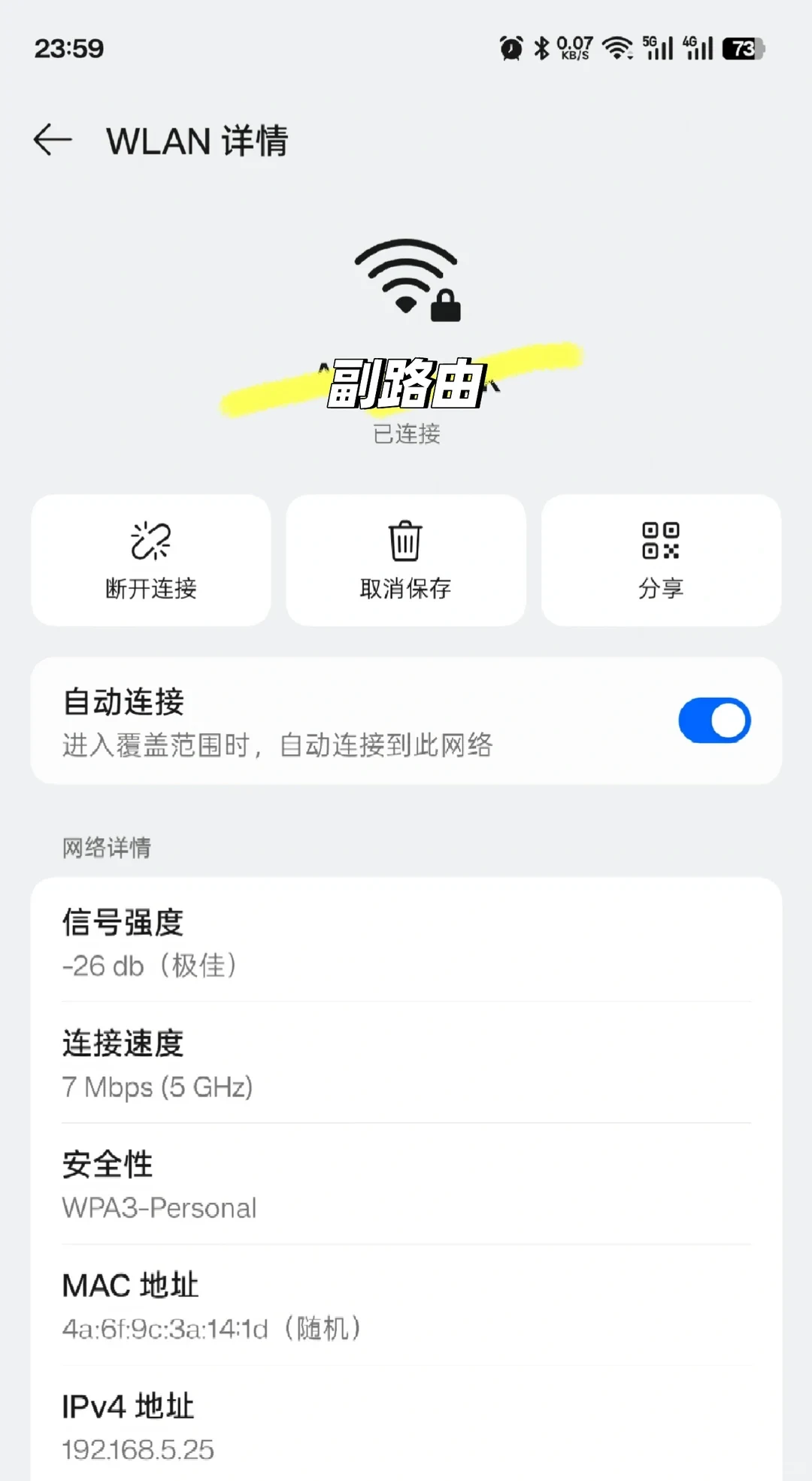
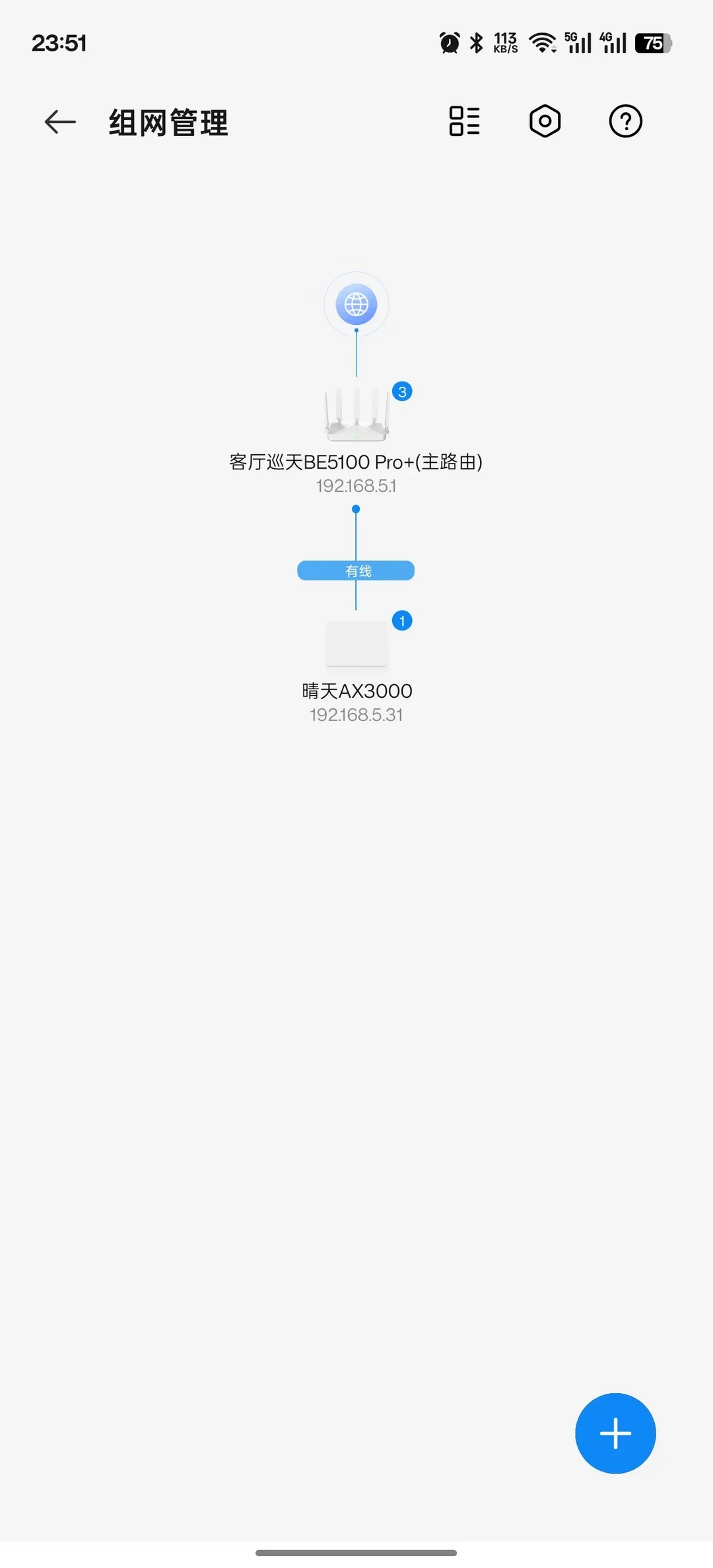
I recently set up a mesh network with a ZTE BE5100 Pro+ and an AX3000. When my phone roamed from the main router to the secondary router, its wireless connection speed dropped to 7 Mbps.
But after I restarted Wi-Fi and connected directly to the secondary router, the rate was over 2,000 Mbps. I checked the settings, and the signal strength looked normal, but the negotiated link speed still would not rise. Can anyone who knows networking help me figure out what is going wrong?
#campusnetwork #QingtianAX3000 #meshnetworking #ZTErouter #seamlessWiFimesh
Source: momo · Xiaohongshu · 2025-08-05 · 中兴路由器mesh组网副路由速度太慢,求支招. Search this Chinese title in Xiaohongshu to find the original post.
Before You Buy
Models in your region
The account concerns a China-market ZTE Xuntian BE5100 Pro+ main router and Qingtian AX3000 wired secondary. The UK/Europe ZTE AX3000 Pro is a related regional reference, not a confirmed equivalent to either Chinese router; the roaming result should not be assumed to apply to it.
| Model in this review | Related regional model | What to know |
|---|---|---|
| ZTE Xuntian BE5100 Pro+ and Qingtian AX3000 | ZTE AX3000 Pro (UK and Europe) | These are the China-market models in the account: the BE5100 Pro+ is the main router and the Qingtian AX3000 is wired as the secondary. The reported roaming issue belongs to this two-router setup. |
- Model in this review
- ZTE Xuntian BE5100 Pro+ and Qingtian AX3000
- Related regional model
- ZTE AX3000 Pro (UK and Europe)
- What to know
- These are the China-market models in the account: the BE5100 Pro+ is the main router and the Qingtian AX3000 is wired as the secondary. The reported roaming issue belongs to this two-router setup.
What the 7 Mbps figure tells you
The 7 Mbps shown on the phone is a negotiated Wi-Fi link rate, not a measured download speed. In the screenshots, the secondary-router connection shows 7 Mbps, while a separate main-router screen shows 2,401 Mbps; the author separately reports seeing over 2,000 Mbps after reconnecting directly to the secondary. Those figures describe different connections and should not be treated as a controlled speed comparison.
The account does not identify the phone model, firmware versions, or a controlled test that isolates the cause. It therefore documents a mismatch between roaming and direct connection in this setup, but does not establish whether the cause is the router, client, settings, or another network condition.
Checking a roaming slowdown
For a similar slowdown, compare the phone’s connected node and displayed link rate before and after reconnecting Wi-Fi, as this account does. Keep those observations separate from a download test: a connection-rate screen alone cannot tell you the available internet throughput. This case remains unresolved, so toggling Wi-Fi is an observation step rather than a confirmed lasting fix.
Related Reading

Reviews & Guides · Computing & Networking
TP-Link Deco X55 in a two-storey Australian home: Wi-Fi across 300 m²
I installed two TP-Link Deco X55 units in my 300 m², two-storey home; bedrooms that often lost Wi-Fi now had a signal throughout the house.
Reviews & Guides · Computing & Networking
TP-Link Deco X55: DNS pauses stopped for six days in access-point mode
I switched my Deco X55 to access-point mode and restored my older router to the front of the network. The DNS-like pauses stayed away for six days.
Reviews & Guides · Computing & Networking
TP-Link Deco X55 after nearly a year: six units, Teams and gaming
I’ve used six TP-Link Deco X55 units for nearly a year, including daily Teams calls and online gaming; I’ve had only one or two connectivity issues.