
Reviews & Guides · Computing & Networking
ZTE Xuntian AX3000 and Small Cube AC1200 mesh: faster study-room Wi-Fi
Reviewed: ZTE Xuntian AX3000, ZTE Small Cube AC1200Regional reference: ZTE Xuntian AX3000 (China); ZTE AX3000 Pro (Miracle / T3000) (UK / Europe official reference)
I paired my ZTE Xuntian AX3000 with a Small Cube AC1200 across a load-bearing wall; my speed test showed faster downloads, though idle latency rose.
- The problem: There was only one Ethernet port in the room, so my main router had to stay in the living room. A load-bearing wall weakened the Wi-Fi signal in my study, affecting my games of Naraka: Bladepoint. I didn’t want to run a cable and interfere with opening and closing the door or the room’s appearance.
- The solution: Wireless mesh networking! After researching it, I found that I could buy a mesh-capable router from the same brand, place it in a dead zone, and connect it wirelessly to extend the signal.
- My equipment:
- Main router: ZTE Xuntian AX3000 in the living room
- Secondary router: ZTE Small Cube AC1200 beside the study computer - A simple three-step setup:
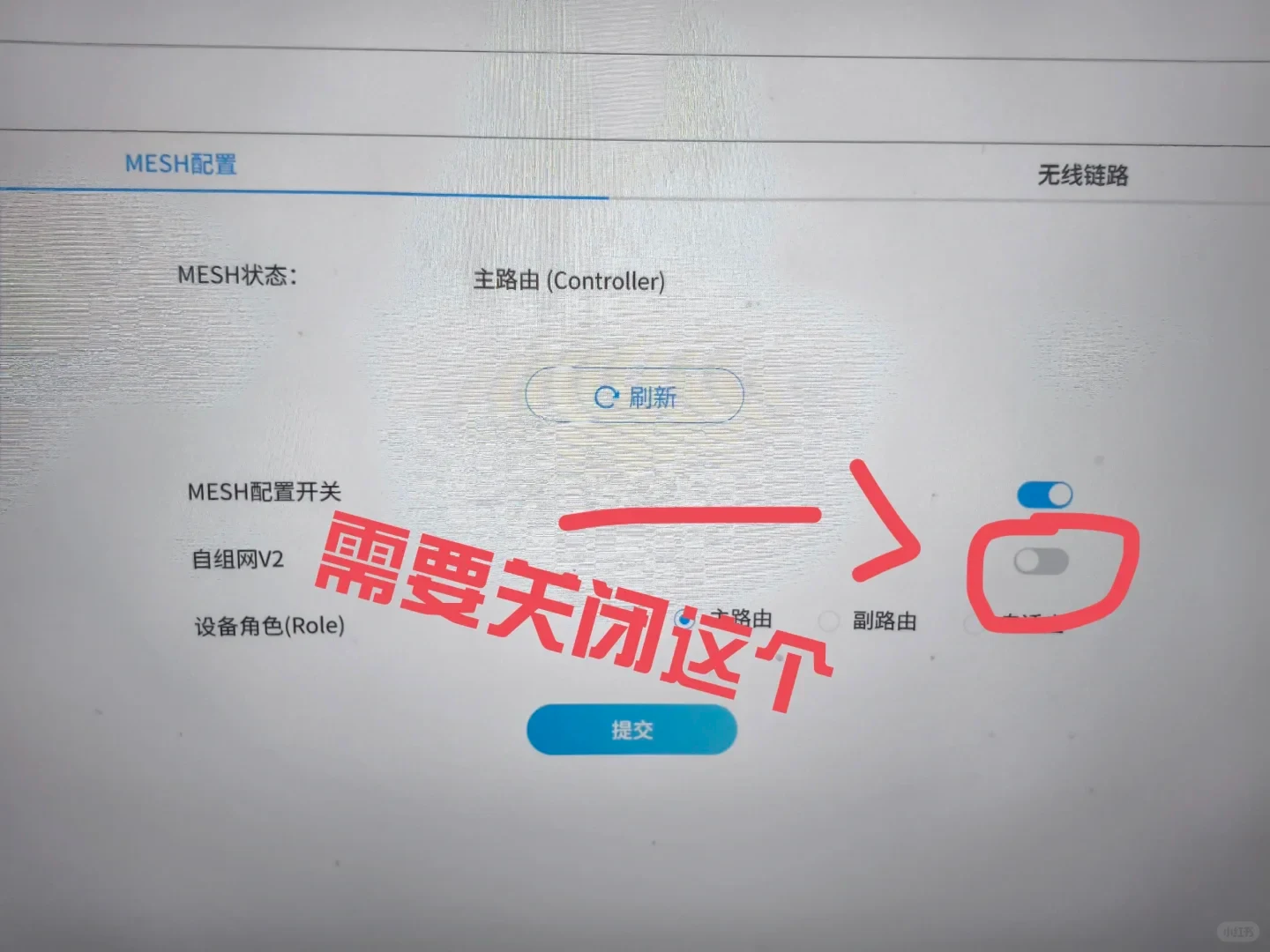
- Turn off “self-mesh” mode: Connect my phone to the main router’s Wi-Fi, open its management page (usually 192.168.5.1), go to Network Settings, and turn off the “Self-Mesh V2” switch. This is the key to making the mesh more stable.
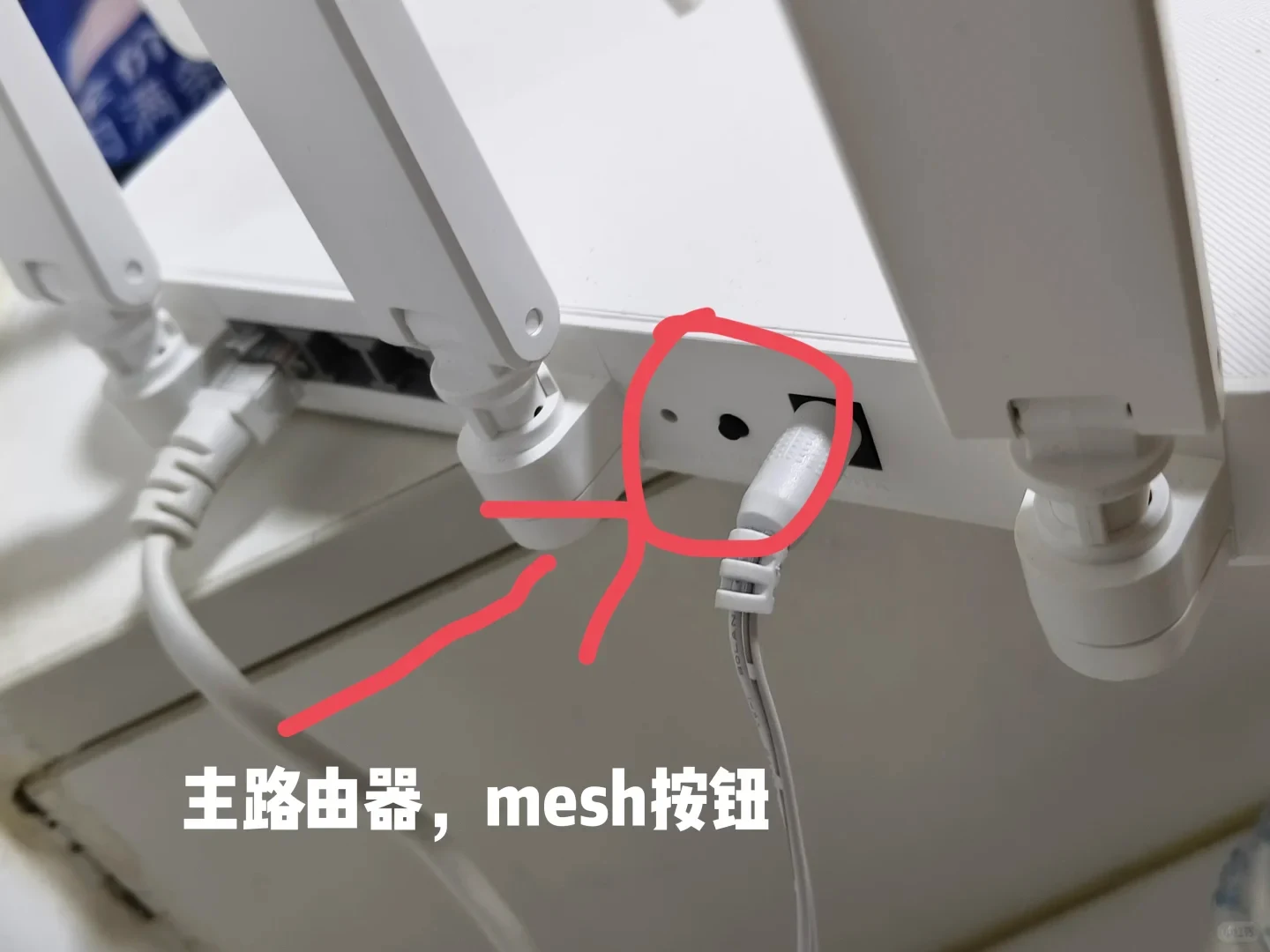
- Start pairing on the main router: Hold its Mesh button for 3 seconds and wait for the green light to flash, indicating it is searching for another router.
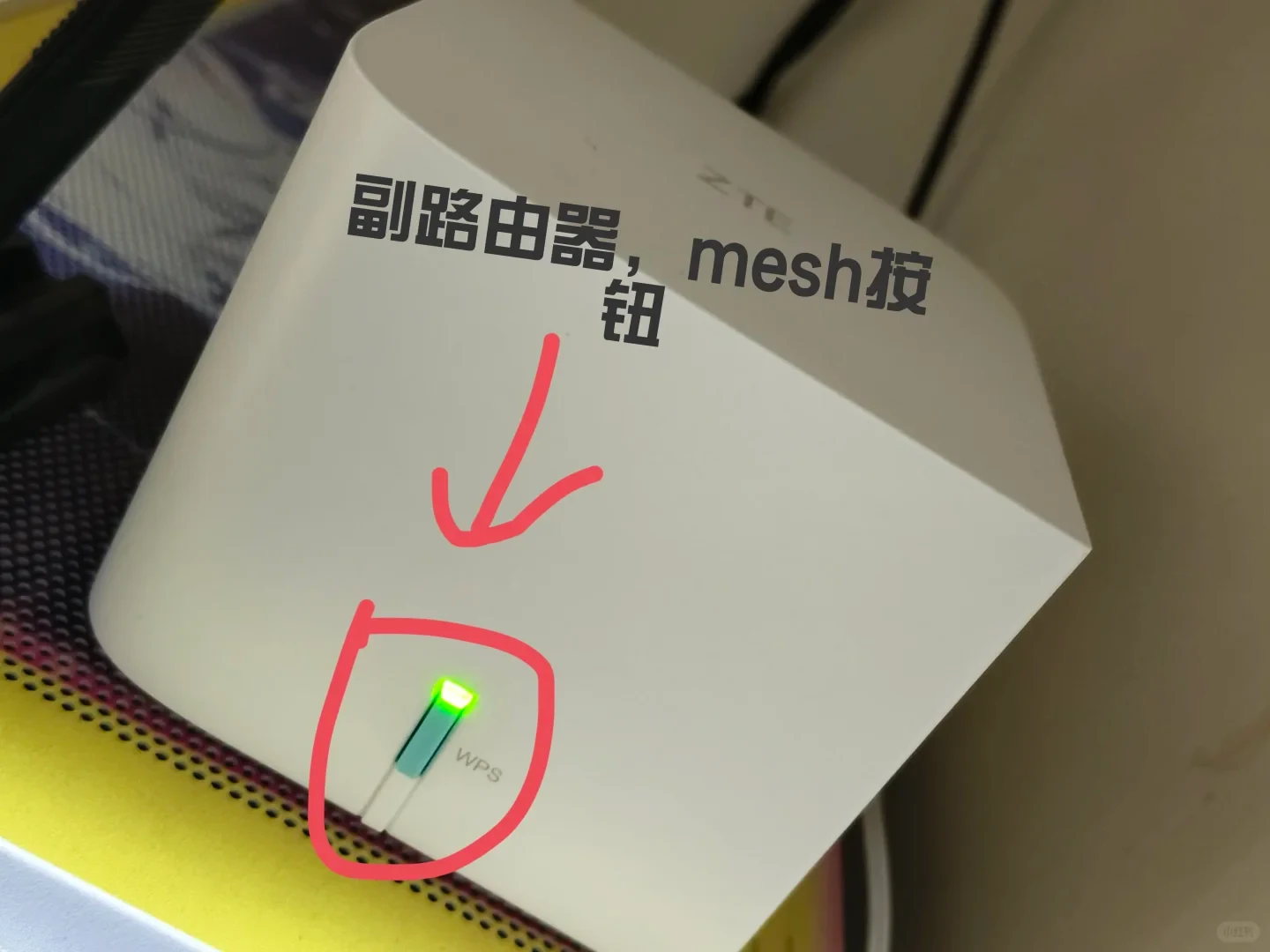
- Join with the secondary router: Plug it in, hold its Mesh button for 5 seconds, and release when the green light flashes. After about a minute, the light stays green. Done!
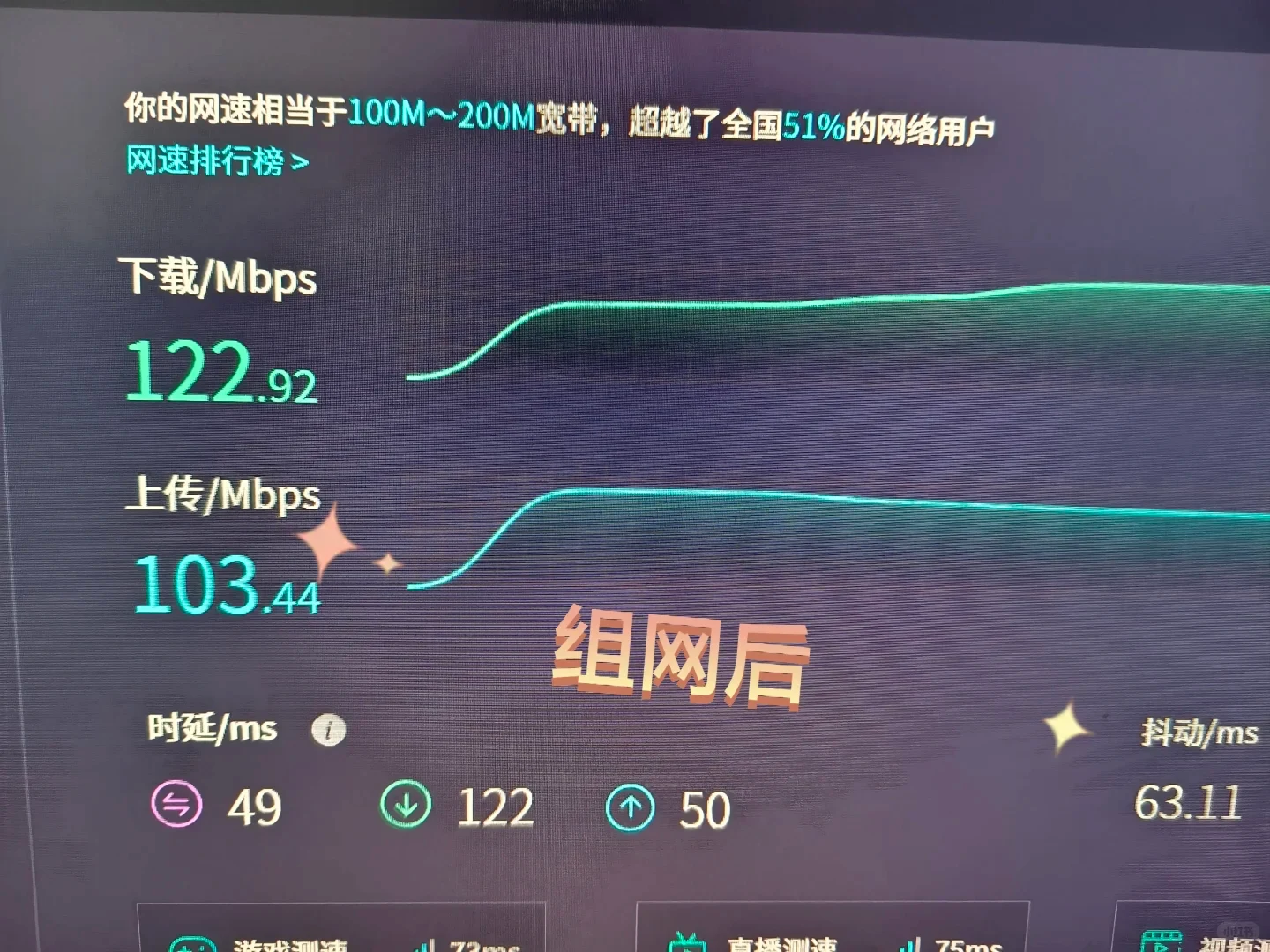
- The results: After setting up the mesh, my devices still used the main router’s Wi-Fi name, so switching was seamless. The speed test was noticeably faster, and I could get back to gaming without lag.
- A question I had: If the secondary router is beside my computer, how can it improve the signal? A router is a device designed for networking, and its related functions are much stronger than a computer’s. So, even in the same location, the secondary router can receive a stronger signal from the main router than the computer can. Once the mesh is set up, the secondary router then boosts and rebroadcasts the signal, bridging and strengthening the connection.
- In short: A Small Cube in the hundred-yuan price range and an easy mesh setup meant no more lag for me—a low-cost way to get Wi-Fi throughout the home. A lifesaver for renters and people in finished homes!
Source: 小黑(养白猫版) · Xiaohongshu · 2025-05-29 · 无线Mesh组网-wifi穿墙信号差且无多余网口. Search this Chinese title in Xiaohongshu to find the original post.
Before You Buy
Models in your region
The owner used China-market routers, while ZTE’s UK/Europe reference is a related AX3000 Pro, also called Miracle / T3000. ZTE’s official information does not establish that it is the same hardware as the Xuntian AX3000 or Small Cube AC1200, or that these regional products can form a mesh together.
| Model in this review | Related regional model | What to know |
|---|---|---|
| ZTE Xuntian AX3000 | ZTE Xuntian AX3000 (China) | The owner’s China-market main router belongs to the official Xuntian AX3000 Wi-Fi 6 family. Its exact hardware SKU is not visible, so the account cannot be tied to a specific SKU; ZTE does not identify it as the European AX3000 Pro. |
| ZTE Small Cube AC1200 | ZTE AX3000 Pro (Miracle / T3000) (UK / Europe official reference) | This was the owner’s China-market secondary node, not the European AX3000 Pro / Miracle / T3000. The official European reference is a related Wi-Fi 6 mesh router, but ZTE’s evidence does not establish compatibility or an equivalent Small Cube model. |
- Model in this review
- ZTE Xuntian AX3000
- Related regional model
- ZTE Xuntian AX3000 (China)
- What to know
- The owner’s China-market main router belongs to the official Xuntian AX3000 Wi-Fi 6 family. Its exact hardware SKU is not visible, so the account cannot be tied to a specific SKU; ZTE does not identify it as the European AX3000 Pro.
- Model in this review
- ZTE Small Cube AC1200
- Related regional model
- ZTE AX3000 Pro (Miracle / T3000) (UK / Europe official reference)
- What to know
- This was the owner’s China-market secondary node, not the European AX3000 Pro / Miracle / T3000. The official European reference is a related Wi-Fi 6 mesh router, but ZTE’s evidence does not establish compatibility or an equivalent Small Cube model.
What the speed tests show
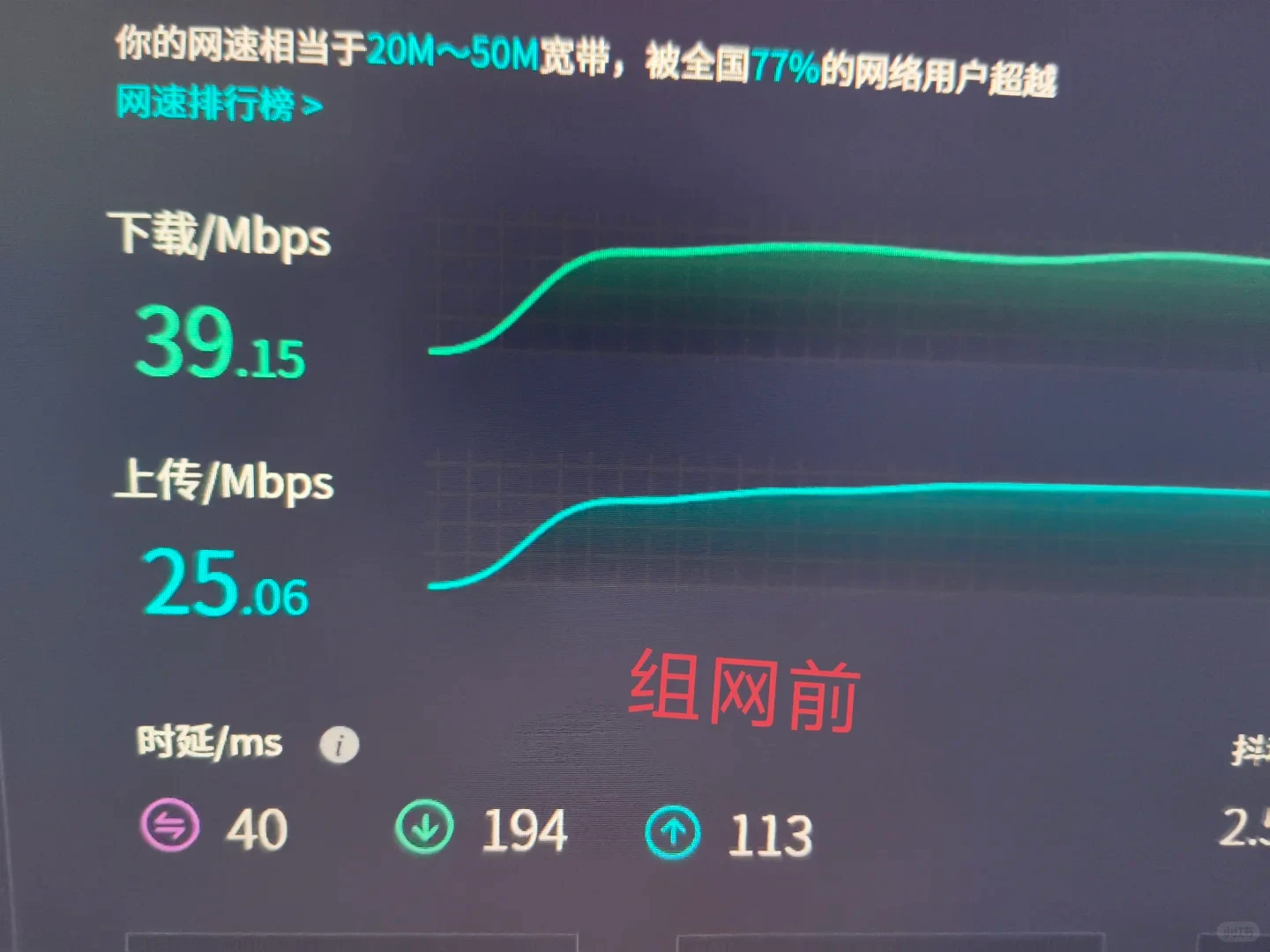
The before-and-after tests show higher throughput after mesh setup: download rose from 39.15 to 122.92 Mbps, and upload from 25.06 to 103.44 Mbps. The latency readings do not show a uniform improvement: idle latency increased from 40 to 49 ms, while the other reported readings fell from 194 to 122 ms and 113 to 50 ms. These are the results for this setup, not a guarantee for other homes or connections.
The mesh kept the same Wi-Fi network name for the devices, avoiding a manual network change when moving between the routers. The account does not report the room’s signal strength, a wired comparison, or repeated tests, so it cannot establish how much of the speed change came from placement, test variation, or the mesh itself.
Check regional identity and pairing before buying
ZTE’s official China reference identifies the Xuntian AX3000 Wi-Fi 6 family, which matches the named main router and the family description; the exact unit label is not shown, so its specific hardware SKU remains unknown. The Small Cube AC1200 is identified by the caption and photograph, but the supplied official evidence does not establish a matching European product.
ZTE’s UK/Europe reference, the AX3000 Pro (Miracle / T3000), is a related Wi-Fi 6 mesh router, not a verified rename or hardware match for either router in the setup. Its design and exact chip, firmware, ports, and pairing behavior are not established as equivalent, and the supplied evidence does not confirm that China and European units can form a mesh together. Check regional compatibility and support for the exact models before purchasing them as a pair.
Treat the setup steps as model-specific
The instructions—turning off “Self-Mesh V2,” then pressing the main and secondary routers’ buttons—describe this particular setup. The account does not identify exact hardware SKUs or firmware versions, so these menu names, button timings, and status lights should not be assumed to apply to other ZTE routers or regional versions.
The owner suggests that a router can receive Wi-Fi better than a computer in the same spot, but the account includes no receiver comparison or measurement to verify that explanation. The practical result reported is that the mesh node was placed beside the study computer and the post-setup speed test was faster; it does not establish why the change occurred.
Related Reading

Reviews & Guides · Computing & Networking
TP-Link Deco X55 in a two-storey Australian home: Wi-Fi across 300 m²
I installed two TP-Link Deco X55 units in my 300 m², two-storey home; bedrooms that often lost Wi-Fi now had a signal throughout the house.
Reviews & Guides · Computing & Networking
TP-Link Deco X55: DNS pauses stopped for six days in access-point mode
I switched my Deco X55 to access-point mode and restored my older router to the front of the network. The DNS-like pauses stayed away for six days.
Reviews & Guides · Computing & Networking
TP-Link Deco X55 after nearly a year: six units, Teams and gaming
I’ve used six TP-Link Deco X55 units for nearly a year, including daily Teams calls and online gaming; I’ve had only one or two connectivity issues.