
Reviews & Guides · Computing & Networking
Anker Prime TB5 Docking Station: one cable for two 4K displays
Reviewed: Anker Prime TB5 Docking Station (A83B5)Regional reference: Anker Prime TB5 Docking Station (A83B5) (US)
I connect two 4K displays, a phone and a keyboard receiver to my MacBook through one cable, which also powers it. Meetings now mean one plug to disconnect.

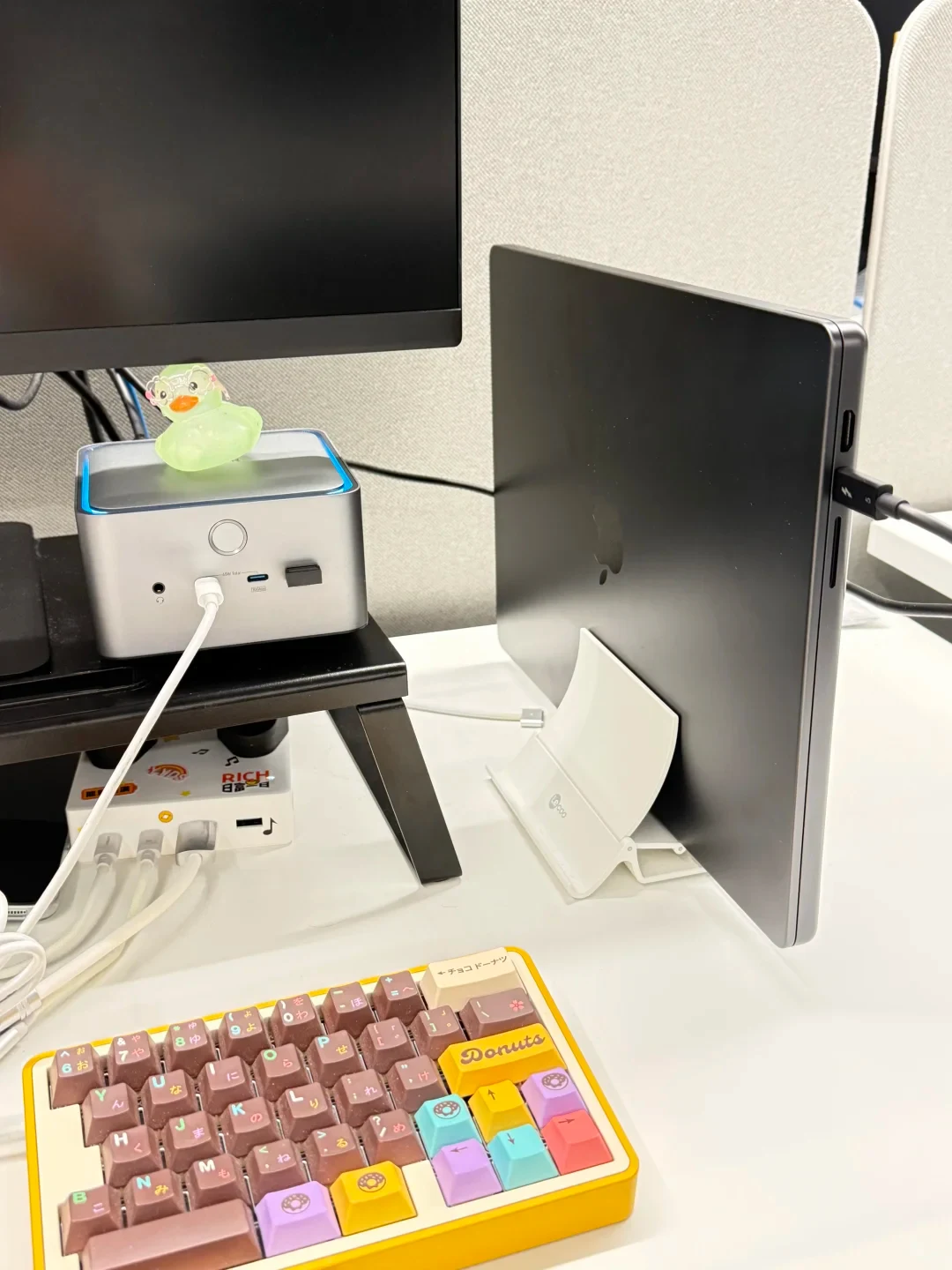
At the office, I use a laptop, and every time I go to a meeting I have to unplug a bunch of cables. When I come back, I have to plug them all in again. It’s a real headache.
I’d had my eye on Anker’s Thunderbolt 5 dock for a long time, but the price was really high, so I kept putting off buying one. Even used, it was over 1,600 yuan. Yesterday I saw it drop to 1,700 yuan after coupons on JD.com, and I couldn’t resist placing an order.
Experience
The dock feels well made. It’s about the same size as an M4 Mac mini and has lots of ports. I don’t need much from an expansion dock, so check the product listing for the specific ports.
The most important thing is the one-cable connection, and it works perfectly for me. Now I only need one Type-C cable connected to my MacBook to run two 4K displays and connect a phone and keyboard receiver, while also powering the MacBook.
When I have a meeting, I only need to unplug one cable. So elegant—so elegant.
Source: 究极幸运鹅xx · Xiaohongshu · 2026-02-06 · 【刚需计划】 MacBook 优雅配件-雷电5拓展坞. Search this Chinese title in Xiaohongshu to find the original post.
Before You Buy
Models in your region
The owner’s Anker Thunderbolt 5 dock is identified as the Prime TB5 Docking Station (A83B5), the same model Anker lists for the US. The owner’s one-cable office setup is a firsthand account; display modes and compatibility still depend on the host, displays and connections.
| Model in this review | Related regional model | What to know |
|---|---|---|
| Anker Prime TB5 Docking Station (A83B5) | Anker Prime TB5 Docking Station (A83B5) (US) | The owner’s dock matches the US-listed A83B5. Anker specifies two downstream Thunderbolt 5 ports and an upstream Thunderbolt 5 connection supporting up to 140 W; HDMI 2.1 and DisplayPort 2.1 are alternative outputs, not simultaneous connections. |
- Model in this review
- Anker Prime TB5 Docking Station (A83B5)
- Related regional model
- Anker Prime TB5 Docking Station (A83B5) (US)
- What to know
- The owner’s dock matches the US-listed A83B5. Anker specifies two downstream Thunderbolt 5 ports and an upstream Thunderbolt 5 connection supporting up to 140 W; HDMI 2.1 and DisplayPort 2.1 are alternative outputs, not simultaneous connections.
Check display connections against your setup
The A83B5 supports two downstream Thunderbolt 5 connections, and Anker describes dual Thunderbolt displays when used with a compatible host. HDMI 2.1 and DisplayPort 2.1 are available as selectable alternatives, but only one of those video outputs can be selected at a time. The owner’s two-4K-display setup is a report from their MacBook, not a guarantee that every host and display combination will work the same way.
Anker Prime TB5 Docking Station (A83B5) · US
Before buying, check how your computer and displays connect: Anker notes that available display modes depend on the host, displays and connection. Its troubleshooting guidance distinguishes the downstream Thunderbolt ports from the selectable HDMI/DisplayPort output, so confirm the intended port arrangement for your particular dual-display setup.
One laptop connection can simplify office changes
The owner’s setup puts two 4K displays, a phone and a keyboard receiver on the dock, with the dock also powering the MacBook through the laptop connection. For this office arrangement, the practical benefit is disconnecting a single cable before a meeting instead of unplugging each peripheral separately. The account does not specify the MacBook model or measure charging power, so it cannot establish compatibility or charging performance for other laptops.
Anker lists up to 140 W for the A83B5’s upstream Thunderbolt 5 connection. Treat that as the dock’s specified maximum, not as a measured result for the owner’s MacBook; the source account does not give a charging rate or laptop model.
Related Reading

Reviews & Guides · Computing & Networking
TP-Link Deco X55 in a two-storey Australian home: Wi-Fi across 300 m²
I installed two TP-Link Deco X55 units in my 300 m², two-storey home; bedrooms that often lost Wi-Fi now had a signal throughout the house.
Reviews & Guides · Computing & Networking
TP-Link Deco X55: DNS pauses stopped for six days in access-point mode
I switched my Deco X55 to access-point mode and restored my older router to the front of the network. The DNS-like pauses stayed away for six days.
Reviews & Guides · Computing & Networking
TP-Link Deco X55 after nearly a year: six units, Teams and gaming
I’ve used six TP-Link Deco X55 units for nearly a year, including daily Teams calls and online gaming; I’ve had only one or two connectivity issues.