
Reviews & Guides · Computing & Networking
TP-Link TL-7DR7290: dual-WAN home-network notes for Archer BE550 buyers
I added a TP-Link TL-7DR7290 to my dual-WAN home network. It now does the heavy lifting in the living room, alongside two other routers and 2.5G links.
To do a good job, one must first sharpen one’s tools. If you want to build a whole-home smart-home system, you first need a stable, powerful network.
Over the past ten years, my routers have gone from TP-Link to Huawei, then Xiaomi, and back to TP-Link. TP-Link is still the least troublesome choice for me. I started with a single 7DR6430 running only the 2.4 GHz band; then I used two 7DR6430 units at the entryway and in the living room for basically full 5 GHz coverage; then I added a 7DR7270 at the entryway and kept two 7DR6430 units in the living room and study for full coverage; finally, I replaced the living-room 6430 with a 7DR7290 to complete the setup. Over.
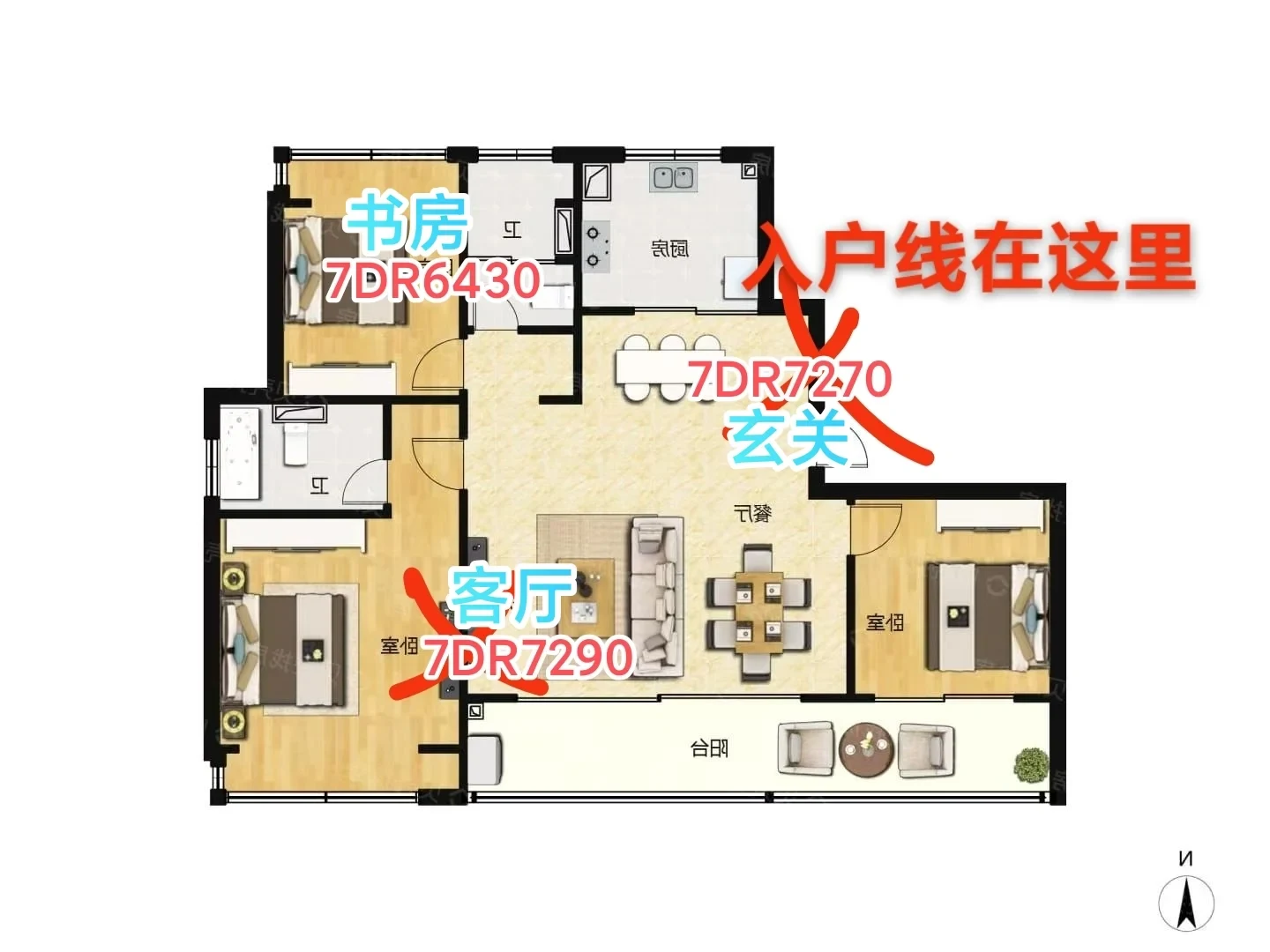
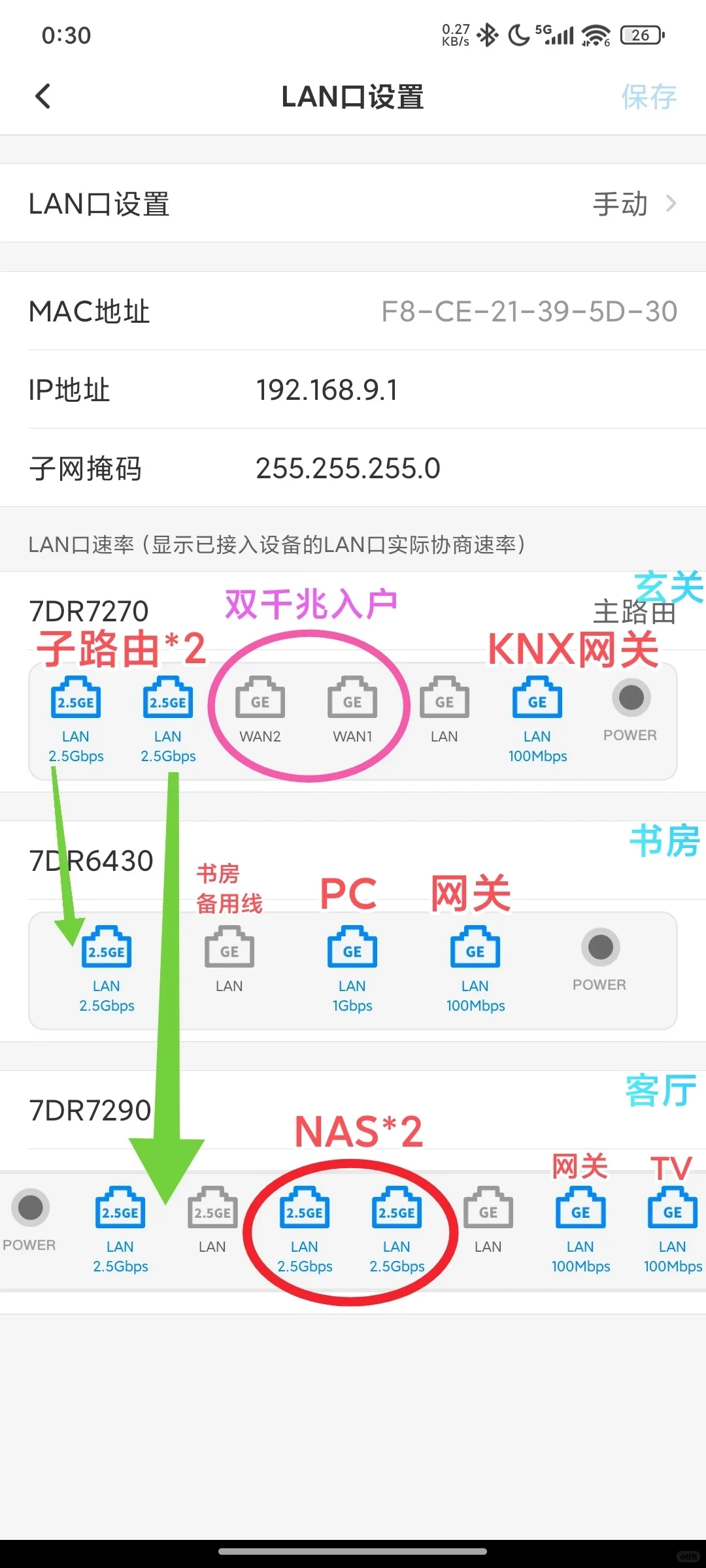
Figure 5: Floor Plan: The internal floor area is a little over 100 square metres. Two gigabit lines from different operators enter through dual WAN. The 7DR7270 is the main router and handles a small number of devices. Its two 2.5G ports connect separately to the living room and study, providing 2.5G internal-network bandwidth. The 7DR7290 in the living room is the actual workhorse, while the 7DR6430 in the study is purely supplementary.
Figure 6: Network Architecture Diagram.
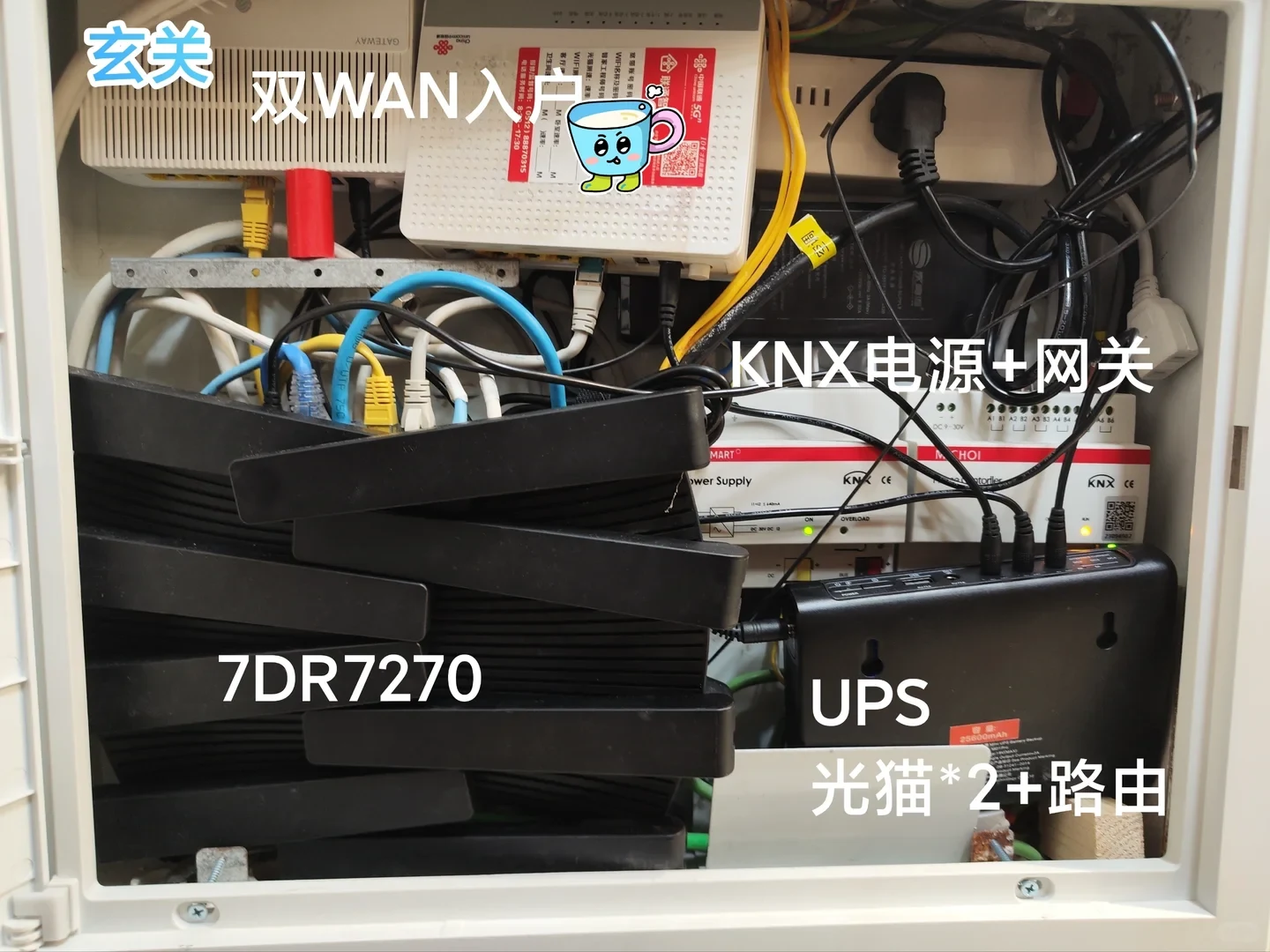
Figure 1: Two optical network terminals at the entryway, the 7DR7270, a UPS, and the physical KNX gateway.
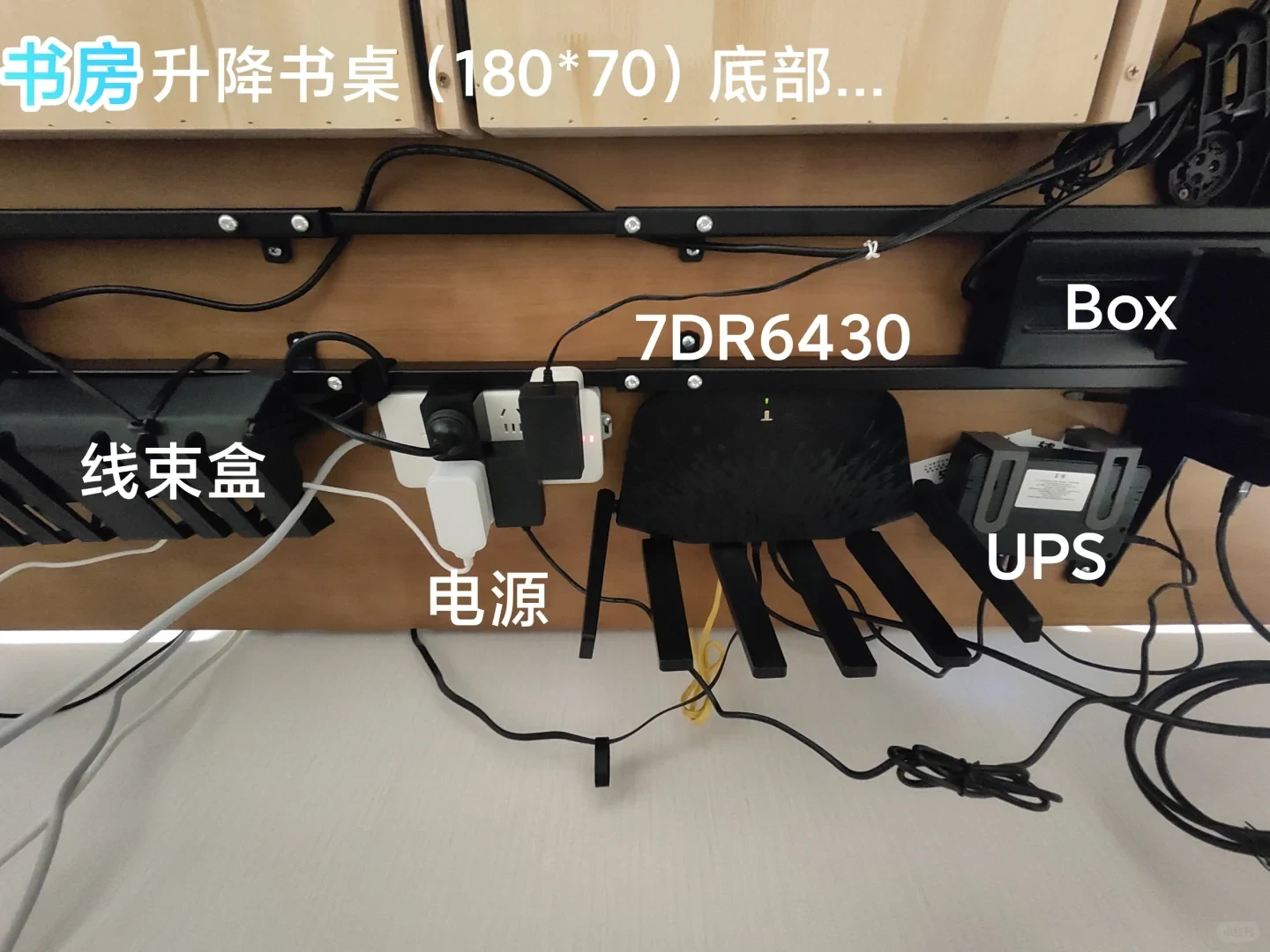
Figure 2: Under the study’s height-adjustable desk, I screwed everything down firmly, and I was very satisfied. My wife, however, went berserk: cable bundles, power strips, the 7DR6430, the gateway, the UPS...
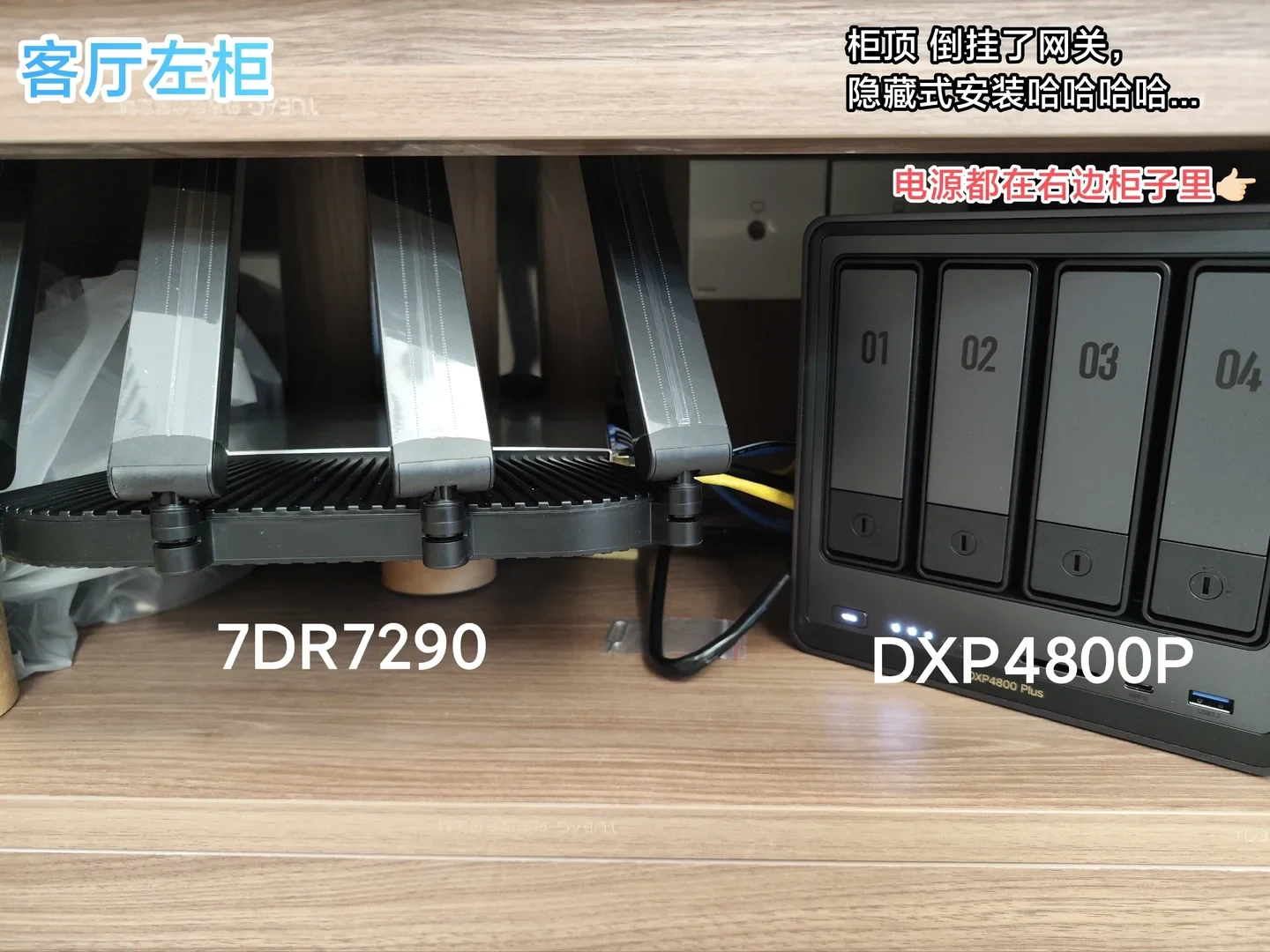
Figure 3: On the left side of the TV cabinet are the 7DR7290, NAS and gateway. One network cable connects the TV and router, and one HDMI cable connects the TV and NAS, with another cable going to a retro learning console. There is no power supply in this compartment; it contains only the equipment.
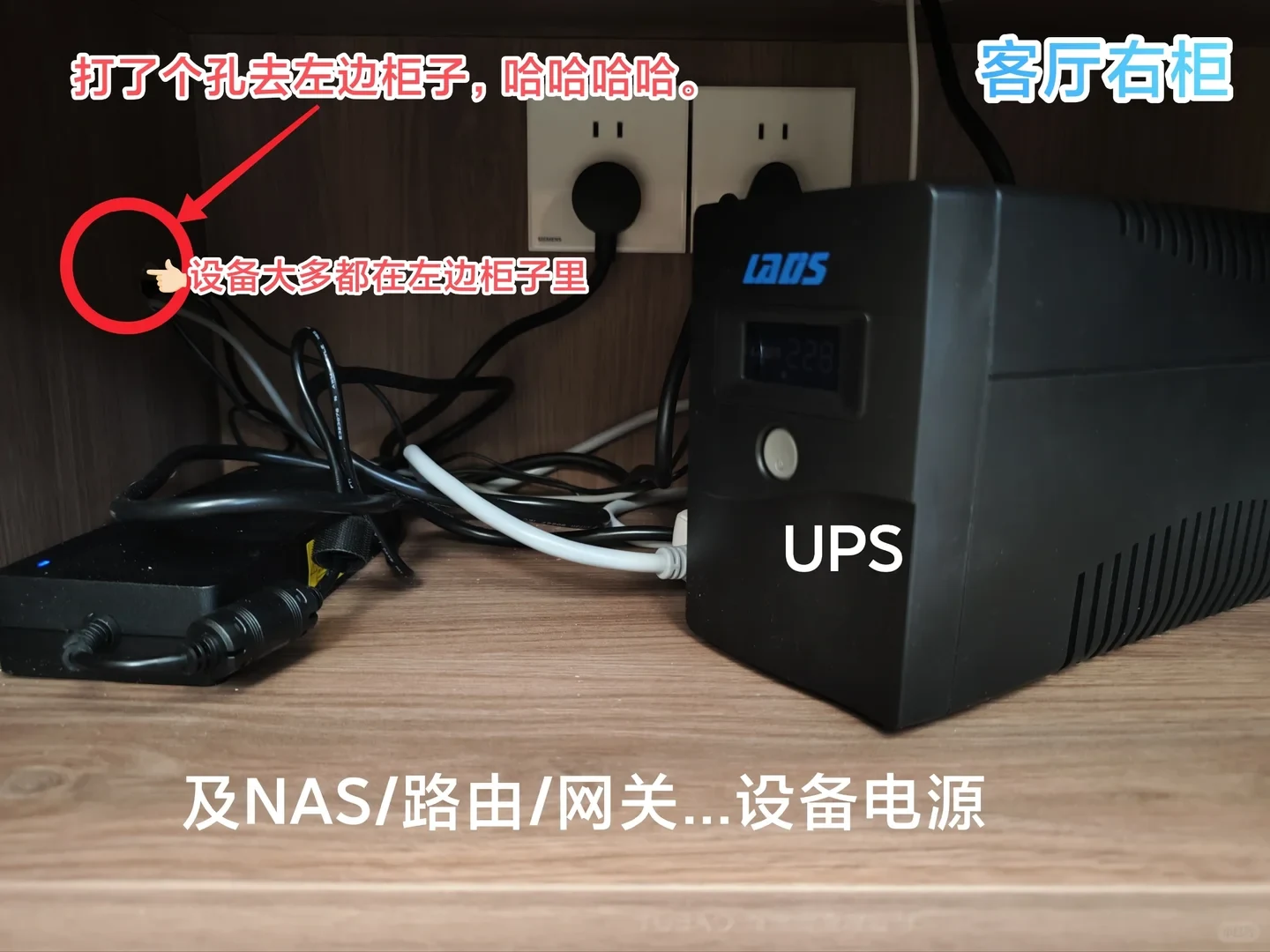
Figure 4: In the middle TV-cabinet compartment, I keep the UPS and power adapters. I drilled a hole to route the power and network cables to the left. Heh heh.
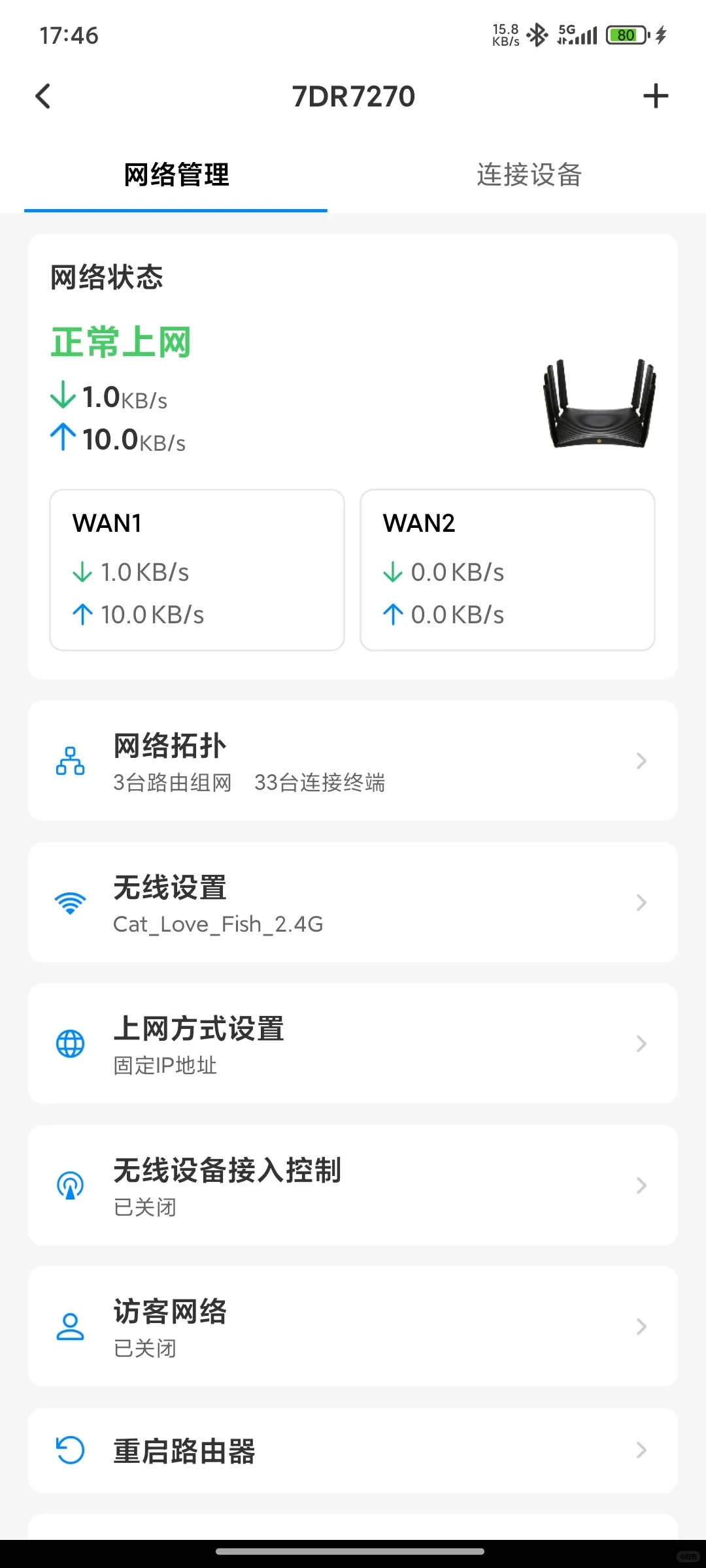
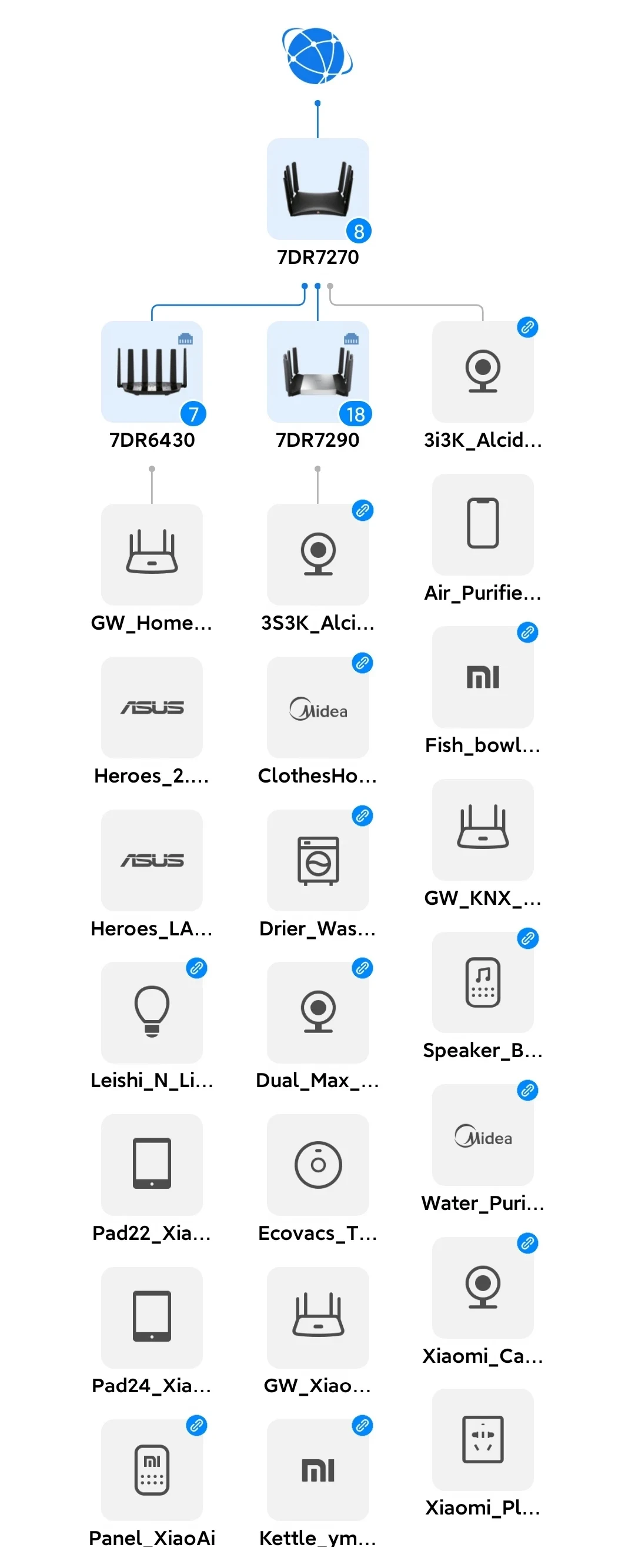
Figures 7 and 8: Network topology...
Source: 菜腿布布 · Xiaohongshu · 2025-11-15 · 全屋WIFI7 双WAN入户 内网2.5G. Search this Chinese title in Xiaohongshu to find the original post.
Before You Buy
Models in your region
The owner identifies the main product as the mainland-China TP-Link TL-7DR7290, used with the Chinese TL-7DR7270 and TL-7DR6430. It is not the same product as the US or UK Archer BE550: those are regional alternatives with different radio bands, ports and management ecosystems.
| Model in this review | Related regional model | What to know |
|---|---|---|
| TP-Link TL-7DR7290 | TP-Link TL-7DR7290 (Mainland China) | TP-Link lists it as a dual-band BE7200 Wi-Fi 7 router with 2.4 GHz and 5 GHz, four 2.5 GbE ports, four gigabit ports, configurable dual WAN, link aggregation and Yizhan mesh. The owner’s 7DR7270 and 7DR6430 are companion Chinese units, not this model. |
| TP-Link TL-7DR7290 | TP-Link Archer BE550 (US) | The owner’s product is the TL-7DR7290; the relevant US alternative is the TP-Link Archer BE550. The US BE550 is not a relabel of the Chinese router: it is a BE9300 tri-band Wi-Fi 7 model with 6 GHz, one 2.5 Gbps WAN port, four 2.5 Gbps LAN ports, EasyMesh and Tether. |
| TP-Link TL-7DR7290 | TP-Link Archer BE550 (UK) | The owner’s product is the TL-7DR7290; the relevant UK alternative is the TP-Link Archer BE550. The UK BE550 is not the same Chinese model: it adds 6 GHz and has one 2.5 Gbps WAN port plus four 2.5 Gbps LAN ports. Hardware revisions vary by region, so match the local label, support and firmware. |
- Model in this review
- TP-Link TL-7DR7290
- Related regional model
- TP-Link TL-7DR7290 (Mainland China)
- What to know
- TP-Link lists it as a dual-band BE7200 Wi-Fi 7 router with 2.4 GHz and 5 GHz, four 2.5 GbE ports, four gigabit ports, configurable dual WAN, link aggregation and Yizhan mesh. The owner’s 7DR7270 and 7DR6430 are companion Chinese units, not this model.
- Model in this review
- TP-Link TL-7DR7290
- Related regional model
- TP-Link Archer BE550 (US)
- What to know
- The owner’s product is the TL-7DR7290; the relevant US alternative is the TP-Link Archer BE550. The US BE550 is not a relabel of the Chinese router: it is a BE9300 tri-band Wi-Fi 7 model with 6 GHz, one 2.5 Gbps WAN port, four 2.5 Gbps LAN ports, EasyMesh and Tether.
- Model in this review
- TP-Link TL-7DR7290
- Related regional model
- TP-Link Archer BE550 (UK)
- What to know
- The owner’s product is the TL-7DR7290; the relevant UK alternative is the TP-Link Archer BE550. The UK BE550 is not the same Chinese model: it adds 6 GHz and has one 2.5 Gbps WAN port plus four 2.5 Gbps LAN ports. Hardware revisions vary by region, so match the local label, support and firmware.
What the owner built
The owner’s network serves a home of slightly more than 100 square metres and uses two gigabit incoming lines through dual WAN. A TL-7DR7270 at the entryway acts as the main router, while the TL-7DR7290 in the living room carries the main coverage role and the TL-7DR6430 supplements the study. This is the owner’s arrangement, not a universal coverage result.
The owner says the TL-7DR7270 uses two 2.5G ports to connect separately to the living room and study, with the goal of maintaining 2.5G internal-network bandwidth. That layout is relevant to buyers planning wired multi-gig links between rooms, but it does not establish wireless throughput or performance for another home.
What the Chinese TL-7DR7290 offers
For the mainland-China TL-7DR7290, TP-Link lists dual-band BE7200 Wi-Fi 7, with 2.4 GHz and 5 GHz radios, 1 GB of DDR4 memory, four 2.5 GbE ports and four gigabit ports. It also lists configurable dual WAN, link aggregation and Yizhan mesh. The published port count does not prove nonblocking aggregate throughput.
The owner’s account is therefore most useful to buyers considering a wired, multi-router Chinese TP-Link installation. Its references to the 7DR7270 and 7DR6430 describe other Chinese units in the same home; they should not be treated as specifications for the TL-7DR7290 itself.
US and UK buying context
US buyers looking for a local TP-Link Wi-Fi 7 option should compare the Archer BE550 rather than assume it is the TL-7DR7290 under another name. The US BE550 is a BE9300 tri-band router with 6 GHz, one 2.5 Gbps WAN port and four 2.5 Gbps LAN ports, plus EasyMesh and Tether support.
The UK Archer BE550 likewise has 6 GHz, one 2.5 Gbps WAN port and four 2.5 Gbps LAN ports, but local hardware revisions can vary. Check the label, regional support and firmware before purchase. The owner’s Chinese-device findings should not be transferred to either BE550 version.
Installation and cable management
The owner’s photographs show the practical cost of this design: dual optical modems, the entryway main router, a UPS and KNX gateway hardware; a firmly mounted 7DR6430 beneath a height-adjustable study desk; and the 7DR7290, NAS and gateway inside the left side of the living-room TV cabinet. A multi-router wired network needs space for equipment, power and cable routing.
The owner routed power and network cables between TV-cabinet compartments through a drilled hole, keeping the equipment in one compartment and the UPS and adapters in another. This makes the installation cleaner from the outside, but the account also shows that cable planning and furniture modifications are part of the setup.
How to interpret the experience
The owner reports a progression from one 7DR6430 to a three-router arrangement and concludes that the TL-7DR7290 completed the system. That conclusion reflects the owner’s coverage needs and preference for TP-Link after several brands, rather than a controlled comparison of speed, latency or reliability.
Before buying, confirm the exact regional model, required WAN and LAN speeds, mesh compatibility and available installation routes. The official Chinese TL-7DR7290 and the US and UK Archer BE550 differ in bands, ports and software ecosystem, so importing the owner’s product or copying the topology may change the result.
Related Reading
Reviews & Guides · Computing & Networking
TP-Link TL-7DR7290: teardown and bandwidth notes for Archer BE550 buyers
I took apart the TP-Link TL-7DR7290, then tested its four 2.5G ports on firmware 1.0.8. Simultaneous two-way traffic revealed their shared bandwidth limit.
Reviews & Guides · Computing & Networking
TP-Link Archer BE550 Pro: Japan IPoE and MLO notes, with Archer BE550 buying context
I bought the Japanese TP-Link Archer BE550 Pro for 10Gbps fiber, but severe MLO latency and recurring IPv6 drops led me to use OpenWrt for routing.

Reviews & Guides · Computing & Networking
TP-Link Deco M4: a four-floor wired-backhaul setup
I used TP-Link Deco M4 units across four floors with Ethernet backhaul, then found my upstairs computer needed an extra switch to get a wired connection.