
Reviews & Guides · Computing & Networking
TP-Link Deco M4: a four-floor wired-backhaul setup
I used TP-Link Deco M4 units across four floors with Ethernet backhaul, then found my upstairs computer needed an extra switch to get a wired connection.

As the title suggests, my home is not very large, but it has four floors including the basement. To provide whole-home Wi-Fi coverage, avoid switching to a different Wi-Fi connection on each floor, and maximize the Wi-Fi signal at the same time, I spent a long time researching and finally chose TP-Link’s entry-level Deco M4. I decided to use the most stable wired-backhaul connection mode. I finally connected the home network last night, so I am recording the process here in case I forget it later.
Equipment: one Deco M4 and one switch on each floor, counting the basement as a floor.
Background: the network trunk enters in the basement. Each upstairs room has a network wall panel, but each panel has only one network port.
Key points
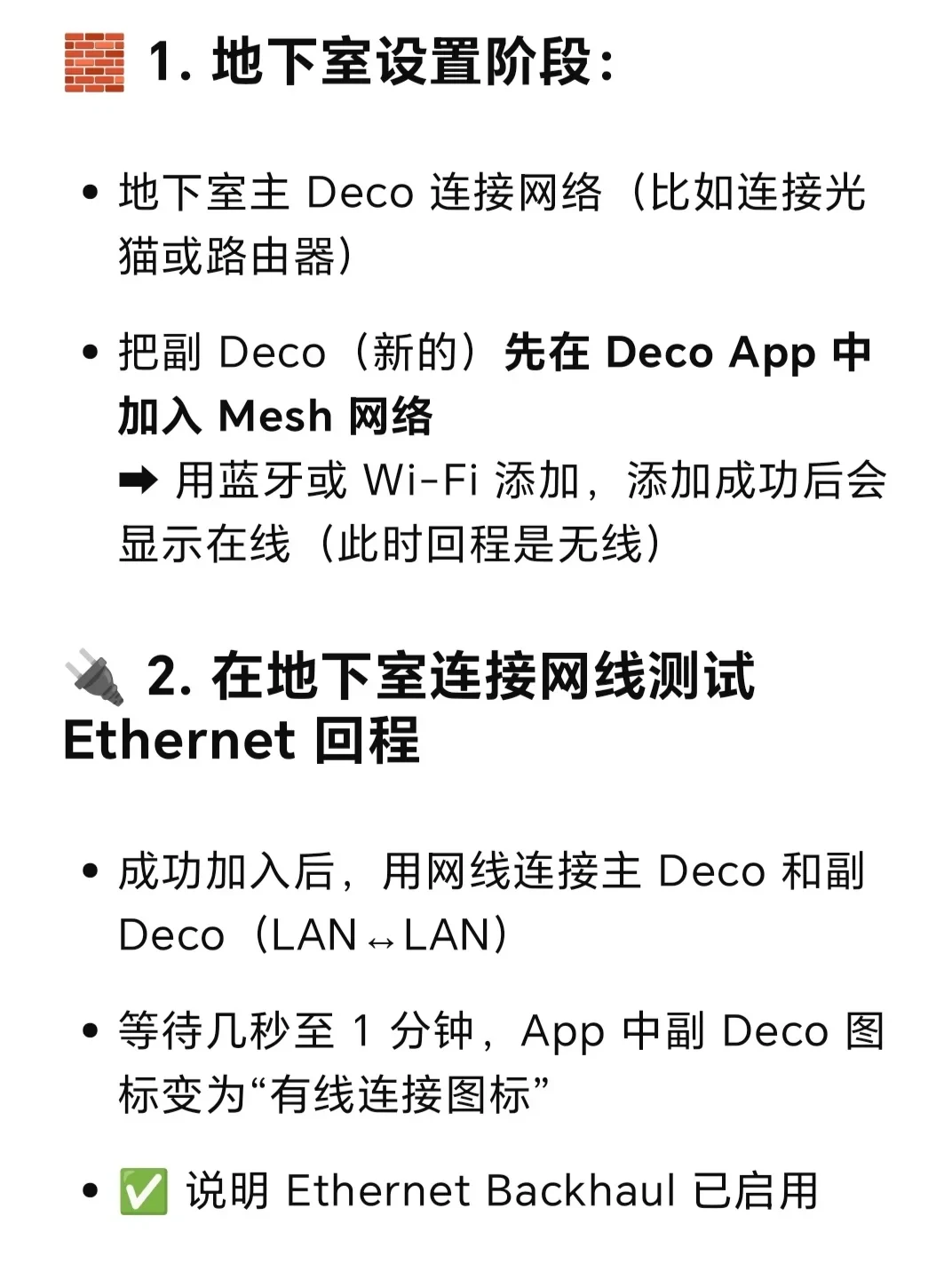
- First, I connected one Deco in the basement to the main router and added it in the Deco app, setting it as the main Deco.
- Then I took each floor’s Deco, also called a satellite Deco, to the basement and added it to the main Deco in the Deco app without connecting it to the main Deco with an Ethernet cable first. This is very important. I used wireless mode in the Deco app to add these Decos to the network. Only then did I connect the main and satellite Decos directly with Ethernet. After about one minute, the Deco app showed that the connection between the satellite and main Deco was wired. That satellite was now configured, so I could take it upstairs and connect it to a network wall panel. Through the basement switch, it connected to the main Deco using wired backhaul.
- I repeated this pairing process until every floor’s satellite Deco had successfully paired with the main Deco over Ethernet, and then the setup was complete.
-
The connection status was as follows:
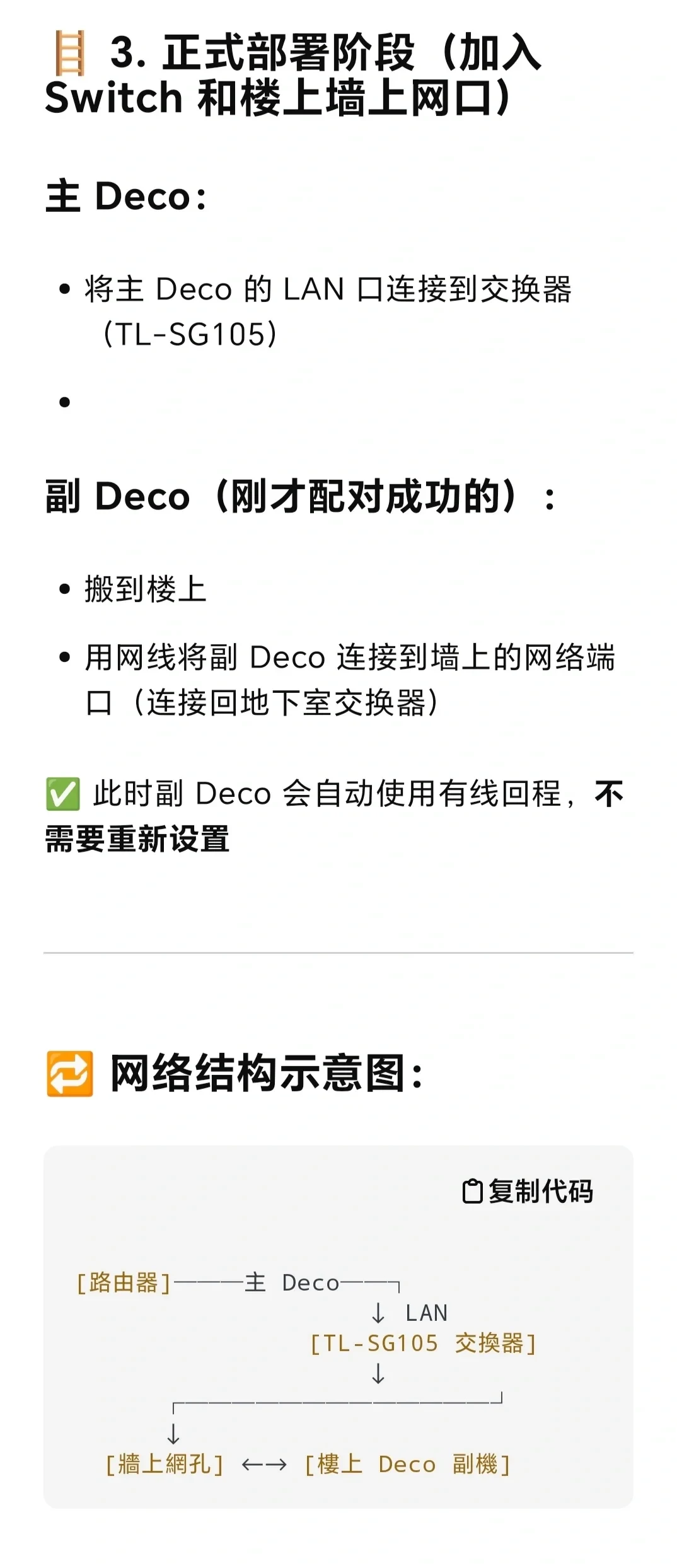
In the basement: one port on the main Deco was connected to the main router, and the other port was connected to a switch. The switch was connected by Ethernet to the network wall panel in each upstairs room.
In the upstairs rooms: each satellite Deco was connected by Ethernet to a network wall panel.
- However, because each room had only one network port, connecting the satellite Deco occupied it, so my computer could only use the wireless network broadcast by the satellite Deco. Although the satellite Deco also had two ports, one was already connected by Ethernet through the wall panel and switch to the main Deco in the basement, and the other port could not pass the network signal. In other words, the satellite Deco could not be used as a switch in my setup, and connecting an Ethernet cable from the satellite Deco directly to the computer did not provide Internet access. Only the main Deco could be used as a switch, so I also needed to add a switch in each room alongside the satellite Deco. The computer and satellite Deco could then both be connected by Ethernet through the switch to the main Deco in the basement. In this way, one satellite Deco plus one switch on each floor provided both wired networking and Wi-Fi.
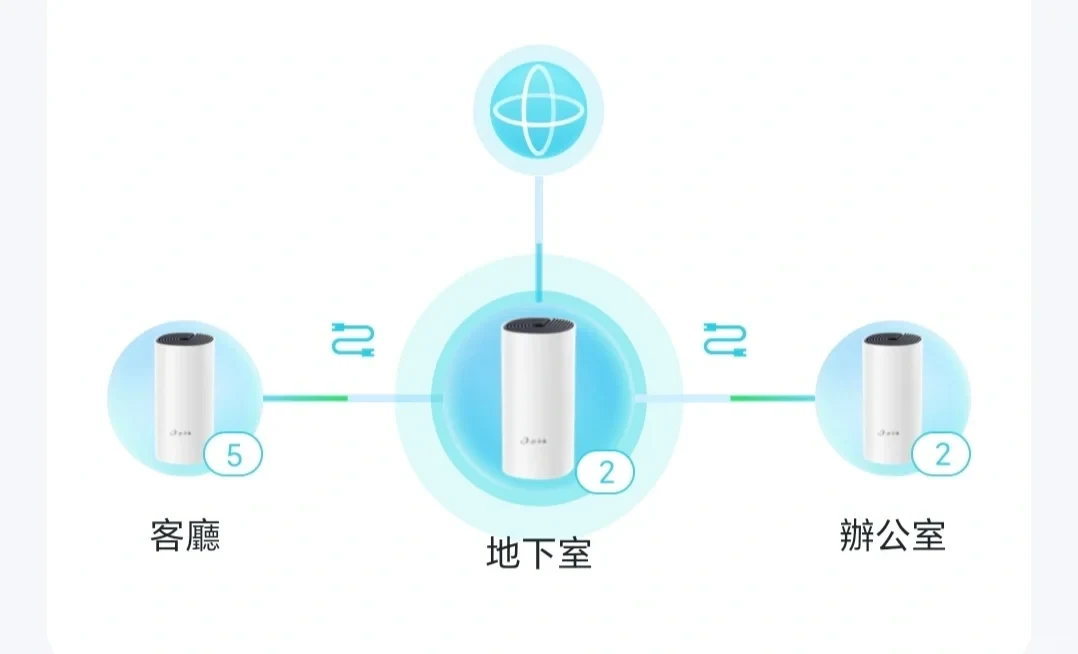
The images show a process summary that I asked GPT to prepare, along with the status icon displayed in the Deco app when the connection uses wired backhaul, shown in the last image.
Source: Momo · Xiaohongshu · 2025-07-24 · 多层住宅使用Deco M4搭建全屋无线wifi. Search this Chinese title in Xiaohongshu to find the original post.
Before You Buy
Models in your region
The owner identifies the product as a TP-Link Deco M4 but does not provide a full hardware revision or regional model number. The official US listing confirms two Gigabit WAN/LAN auto-sensing Ethernet ports per unit and optional Ethernet backhaul; the UK support guidance covers the same model family’s wired-backhaul setup.
| Model in this review | Related regional model | What to know |
|---|---|---|
| TP-Link Deco M4 | TP-Link Deco M4 (US) | The US Deco M4 belongs to the same model family. The owner does not give a full model number or hardware revision, so the exact revision of the four-floor installation is uncertain. The US listing specifies two Gigabit WAN/LAN auto-sensing Ethernet ports per unit and optional Ethernet backhaul. |
| TP-Link Deco M4 | TP-Link Deco M4 / Deco Ethernet backhaul (UK) | TP-Link’s UK guidance covers Ethernet backhaul for the Deco M4 family. It supports configuring units wirelessly before connecting Ethernet, and says router-mode satellites can connect behind the main Deco through a switch. Regional availability and hardware revision are not established by the owner’s account. |
- Model in this review
- TP-Link Deco M4
- Related regional model
- TP-Link Deco M4 (US)
- What to know
- The US Deco M4 belongs to the same model family. The owner does not give a full model number or hardware revision, so the exact revision of the four-floor installation is uncertain. The US listing specifies two Gigabit WAN/LAN auto-sensing Ethernet ports per unit and optional Ethernet backhaul.
- Model in this review
- TP-Link Deco M4
- Related regional model
- TP-Link Deco M4 / Deco Ethernet backhaul (UK)
- What to know
- TP-Link’s UK guidance covers Ethernet backhaul for the Deco M4 family. It supports configuring units wirelessly before connecting Ethernet, and says router-mode satellites can connect behind the main Deco through a switch. Regional availability and hardware revision are not established by the owner’s account.
What the owner’s layout requires
The owner’s installation spans four floors, including a basement, with the network trunk and main router downstairs, one wall Ethernet port in each upstairs room, and one Deco M4 assigned to each floor. The account therefore describes a specific multi-floor wired-backhaul deployment rather than a general claim about every Deco M4 installation.
For a similar layout, the owner’s sequence is useful: configure the main Deco first, add each satellite wirelessly in the app, and connect Ethernet only after pairing. TP-Link’s UK guidance supports this setup order for Ethernet backhaul.
Planning ports and switches
The owner had only one wall port in each upstairs room, so connecting a satellite Deco used that port. The owner then added a separate switch in each room to connect both the satellite and computer through the building’s Ethernet run. This is a solution for that reported wiring arrangement, not a confirmed requirement for every satellite Deco.
The US specification lists two Gigabit WAN/LAN auto-sensing Ethernet ports on each Deco, while the official UK guidance says router-mode satellites can connect behind the main Deco directly or through a switch. Because the owner’s spare satellite port did not provide a working computer connection, buyers should test the port, cable, switch path, and operating mode before assuming an extra switch is unavoidable.
If wired backhaul does not appear
In the owner’s process, the app showed the satellite-to-main connection as wired after roughly one minute of Ethernet connection. If a similar installation does not show wired backhaul, TP-Link’s UK troubleshooting guidance recommends checking the IPTV port setting, changing ports, testing a direct connection without the switch, and trying another Ethernet cable. The source account does not establish which component caused its failed computer connection.
Related Reading
Reviews & Guides · Computing & Networking
TP-Link Archer BE550 Pro: Japan IPoE and MLO notes, with Archer BE550 buying context
I bought the Japanese TP-Link Archer BE550 Pro for 10Gbps fiber, but severe MLO latency and recurring IPv6 drops led me to use OpenWrt for routing.
Reviews & Guides · Computing & Networking
TP-Link Deco X50 Pro: fixing weak upstairs Wi-Fi in a Canadian home
I used a TP-Link Deco X50 Pro mesh system to fix weak upstairs Wi-Fi from a garage router after a cheap extender failed; setup was simple.

Reviews & Guides · Computing & Networking
TP-Link Deco X55: a three-floor installation reached about 400 Mbps upstairs
I installed three TP-Link Deco X55 units for a friend and found setup took about 10 minutes, with roughly 400 Mbps still available on the top floor.