
Reviews & Guides · Computing & Networking
TP-Link TL-7DR7290: strong nearby speeds, weaker coverage at the edge
Reviewed: TP-Link TL-7DR7290Regional reference: TP-Link TL-7DR7290 (Mainland China); TP-Link Archer BE550 (US); TP-Link Archer BE550 (UK)
I tested the TP-Link TL-7DR7290 with six Wi-Fi test points and 62 phones: nearby speeds were strong, but the weakest point still reached only just over 300 Mbps.
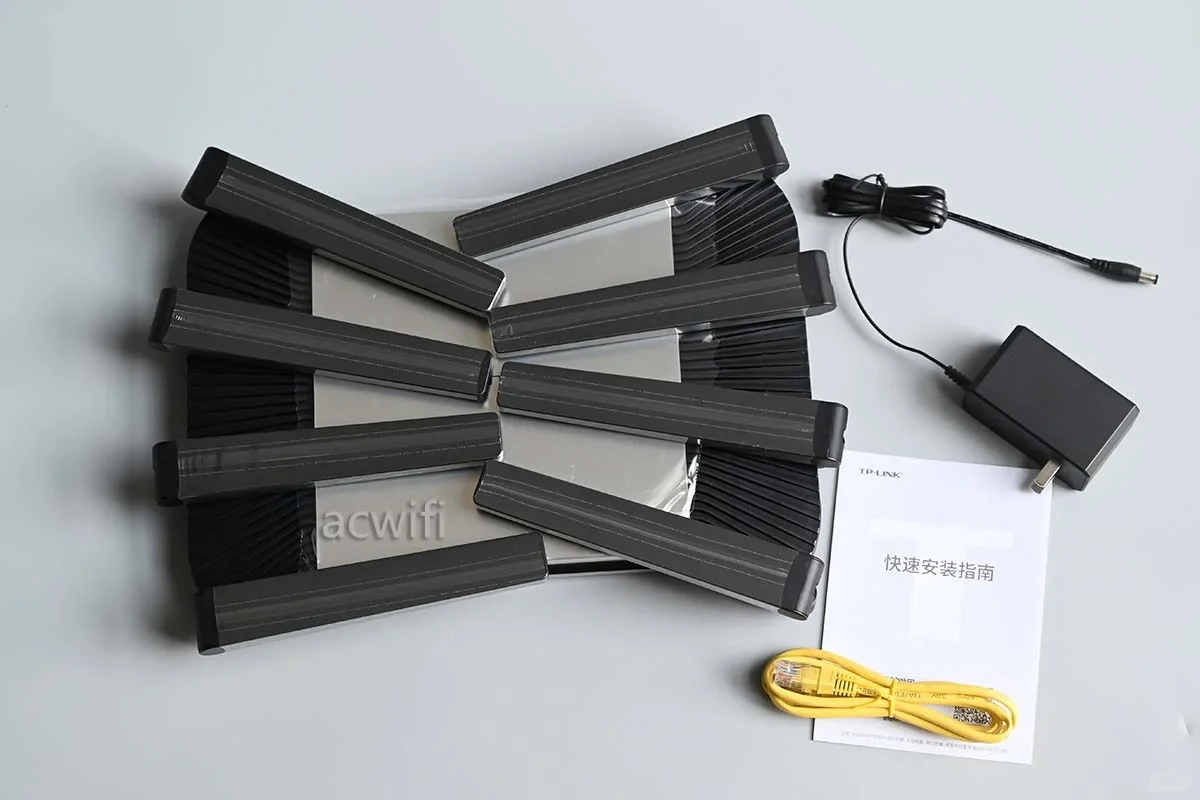
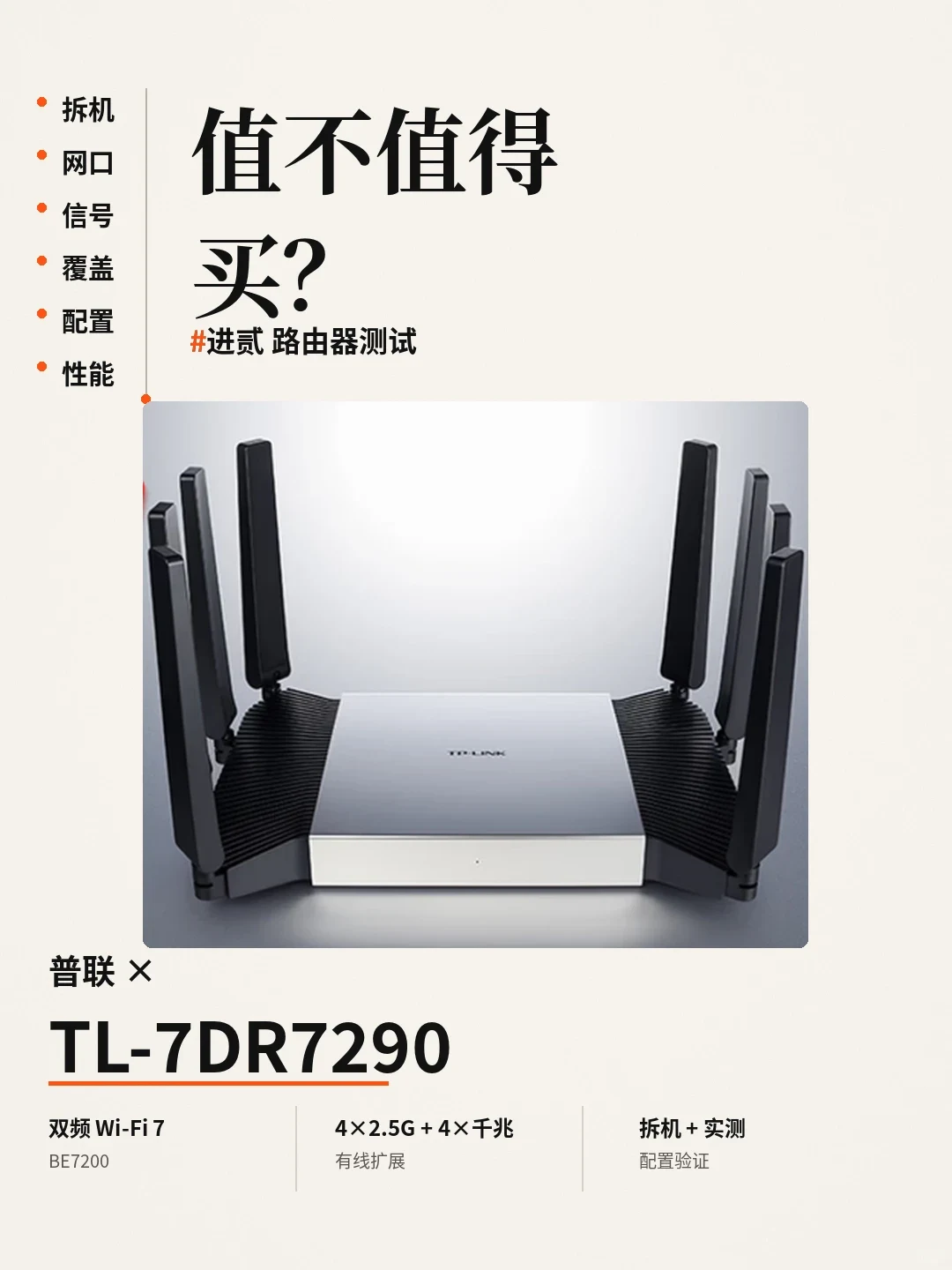





This year, the TP-Link 7DR7290 and 7299 Wi-Fi 7 routers have both attracted plenty of attention.
Their names differ by only one digit, but they target very different users: the 7299 focuses on dual 10-gigabit networking and professional home-network setups.
So what is the TP-Link 7290 actually like?
We’ve completed our teardown and testing. The short version: it’s a cost-conscious, high-performance option for an ordinary home.
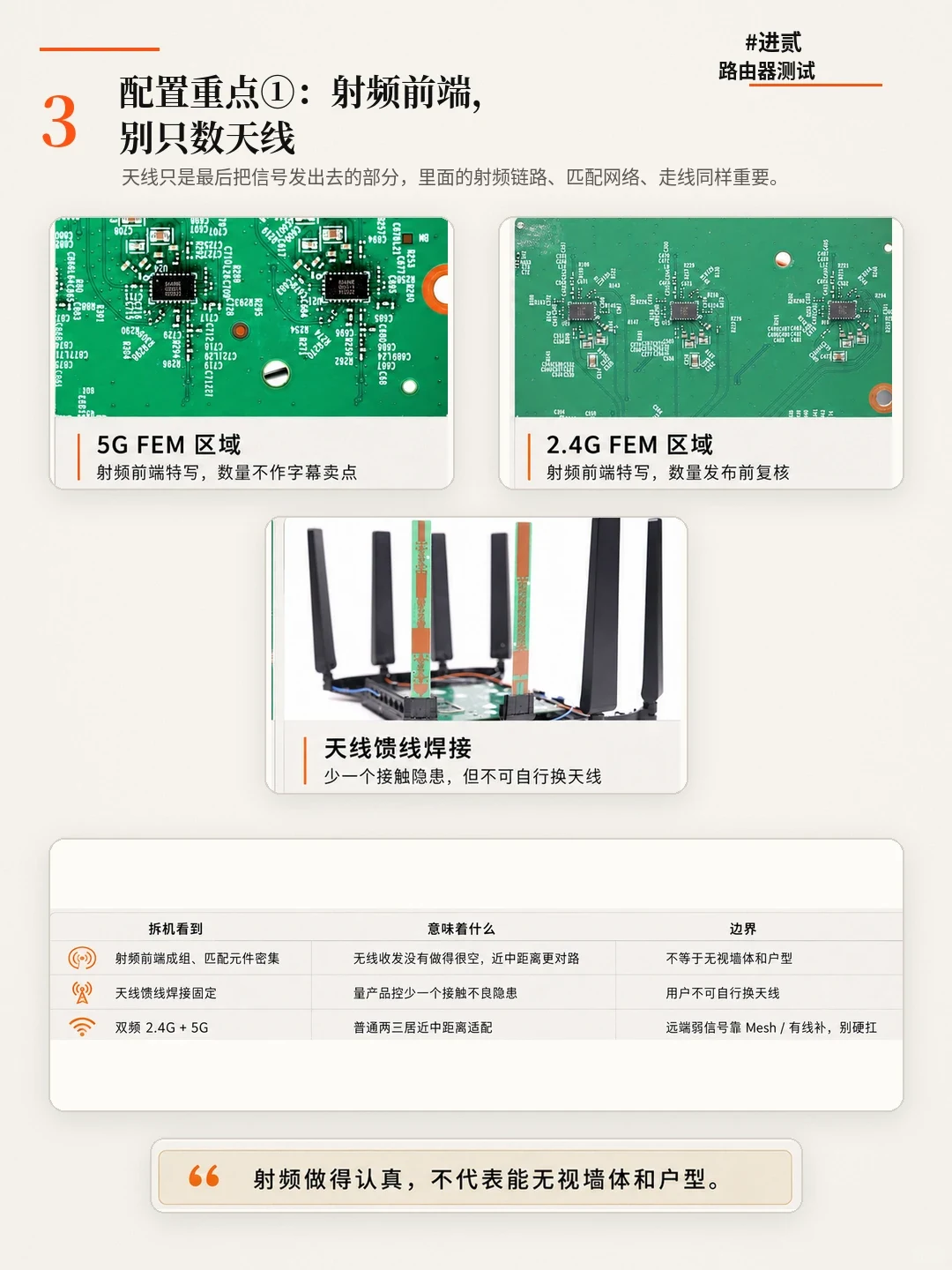
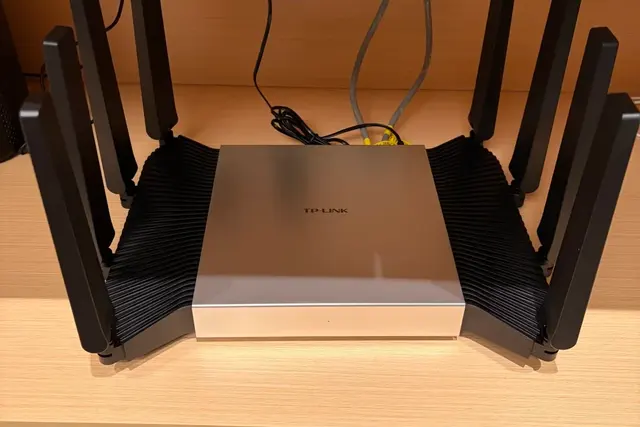
After opening the 7DR7290, my first impression was that TP-Link had put substantial effort into its internals.
The main processor, wireless, and switching sections all have extensive shielding and heat-dissipation structures, leaving some headroom for heavy loads.
Still, this router shouldn’t be squeezed into a sealed wiring cabinet with the modem and power supply.
It’s better placed in a ventilated, relatively central spot, such as a living room or study.
You don’t need to memorize every specification. Three points are enough:
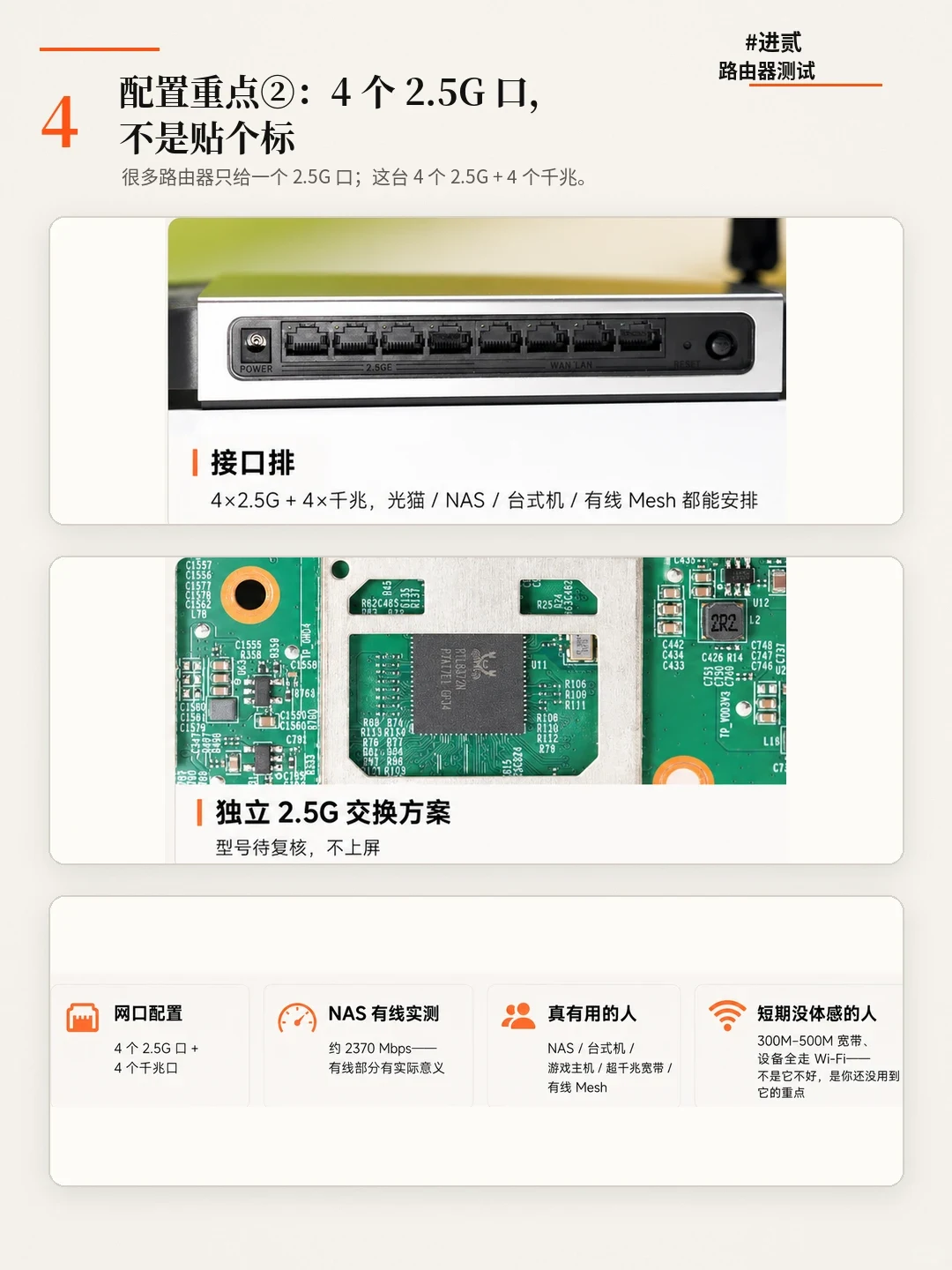
① Dual-band Wi-Fi 7, with no 6 GHz band. ② Four 2.5G ports plus four gigabit ports make it easy to connect a NAS, computer, game console, or wired mesh system. ③ 1 GB of memory gives it more room to handle a busy household network.
The test results broadly matched the hardware configuration.
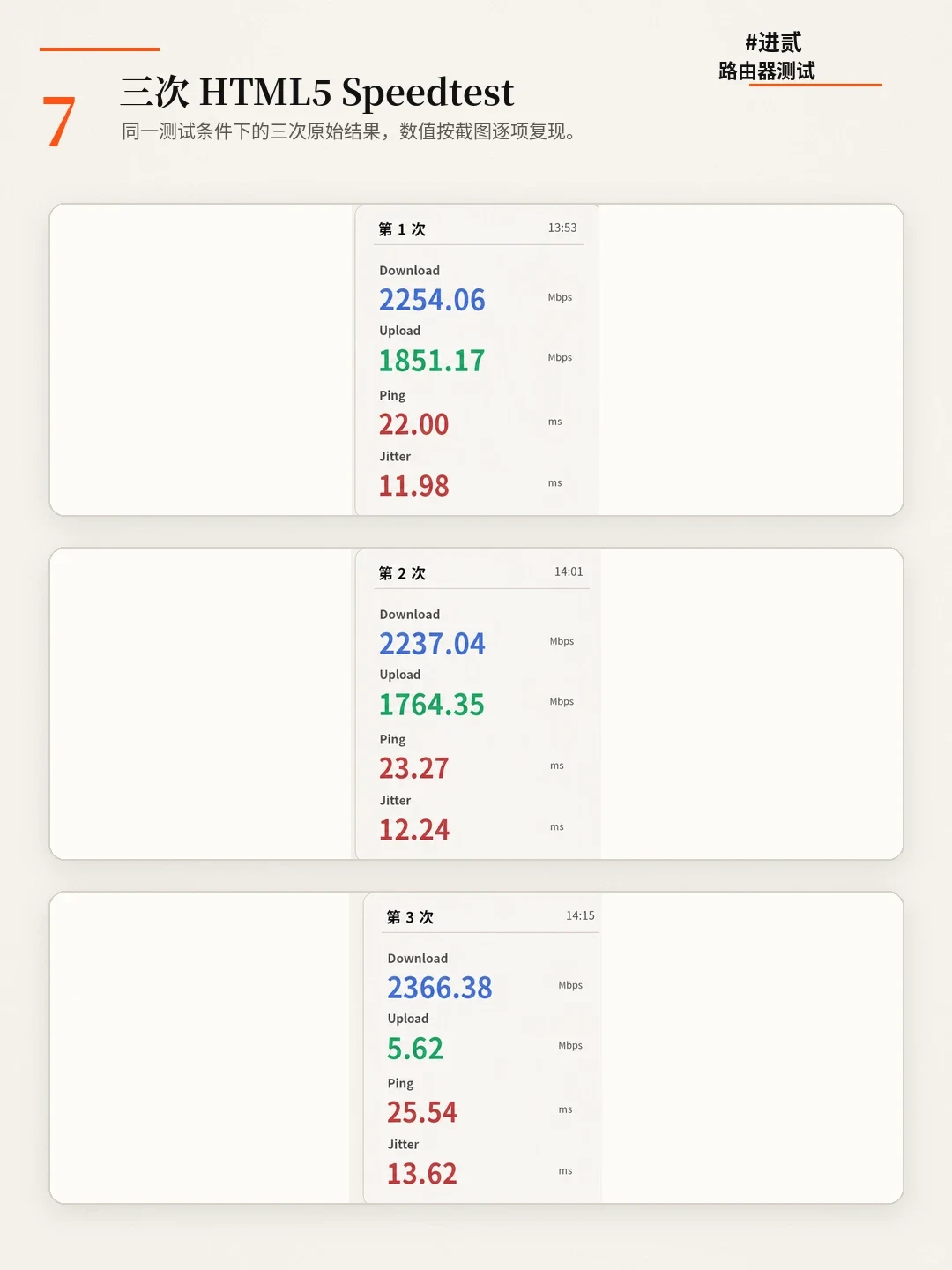
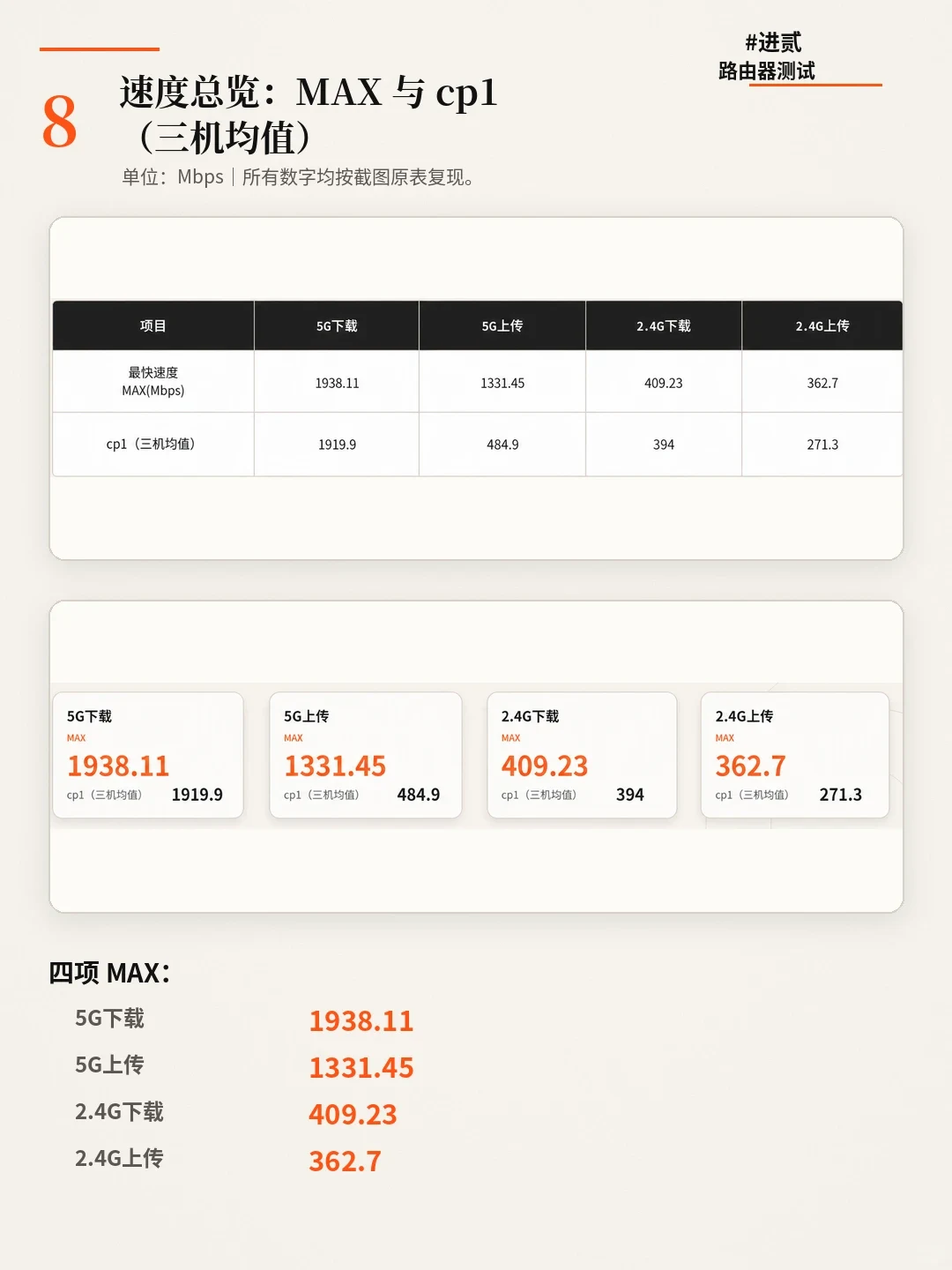
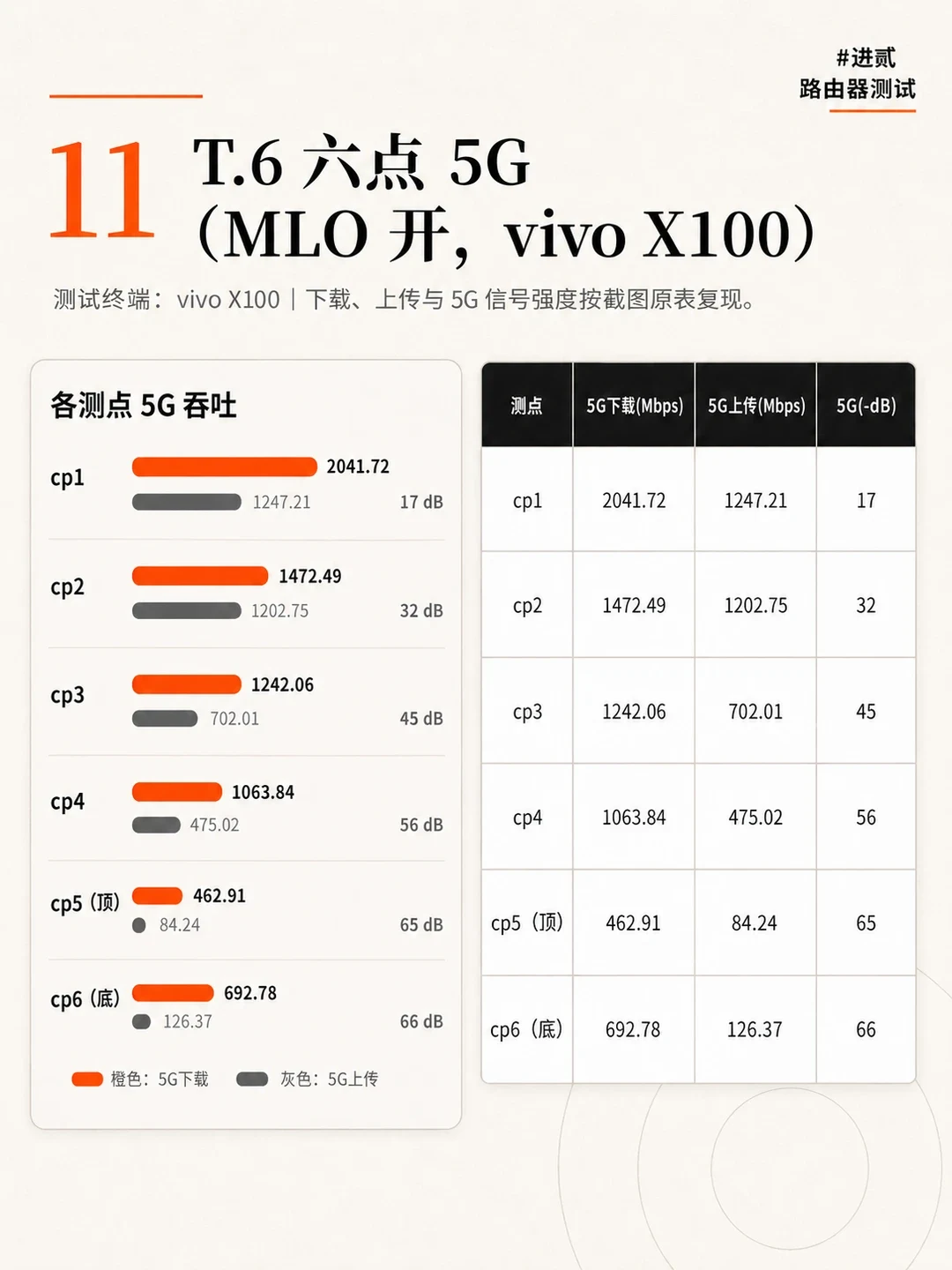
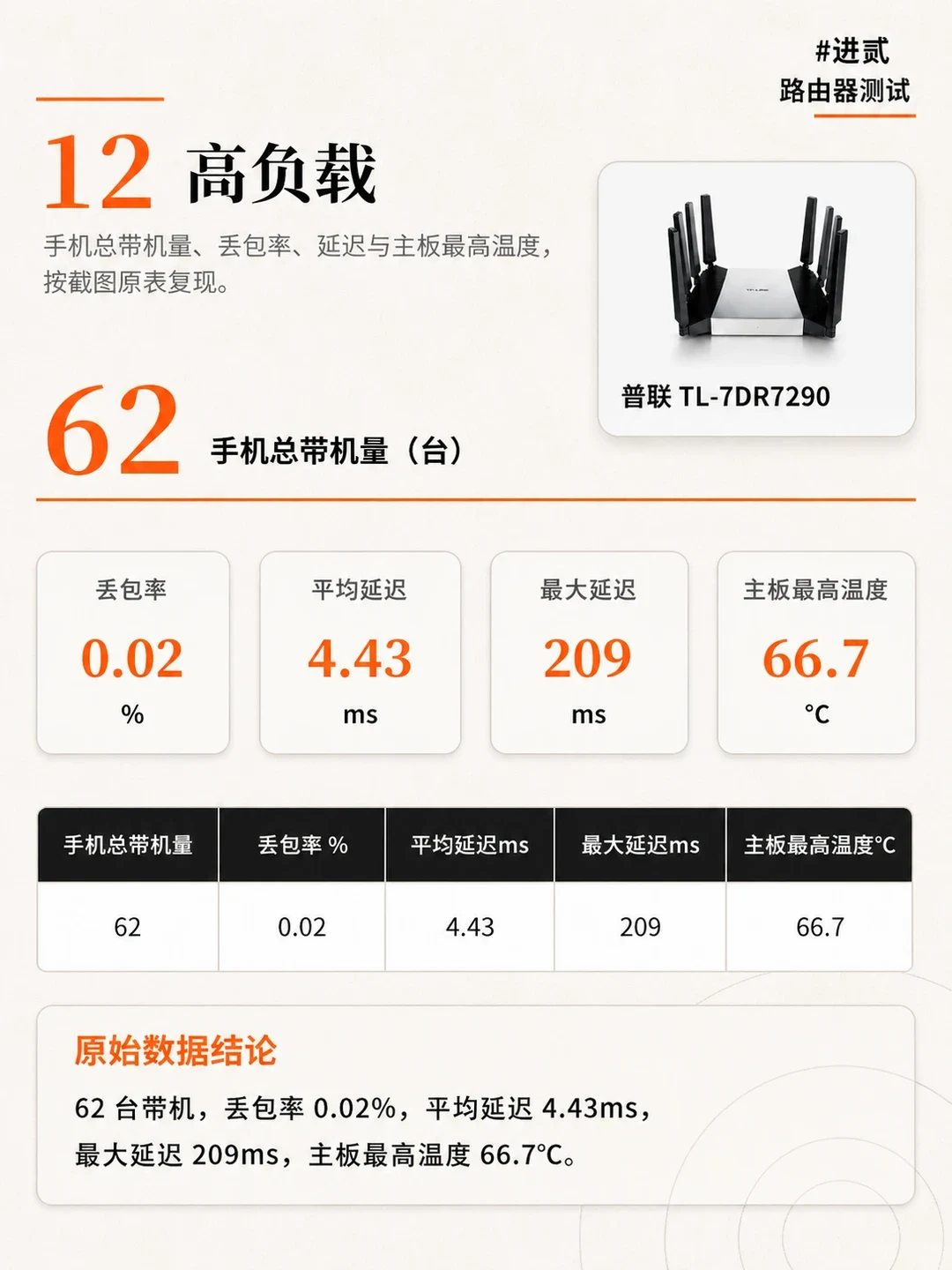
The 2.5G Ethernet port came close to full speed. At extremely close range, a phone reached about 2,366 Mbps; at near-to-medium range, three devices averaged about 1,730 Mbps in downloads. With 62 devices running simultaneously, packet loss was about 0.02%, average latency was 4.43 ms, and maximum latency was 209 ms. Multi-device stability was good in this test.
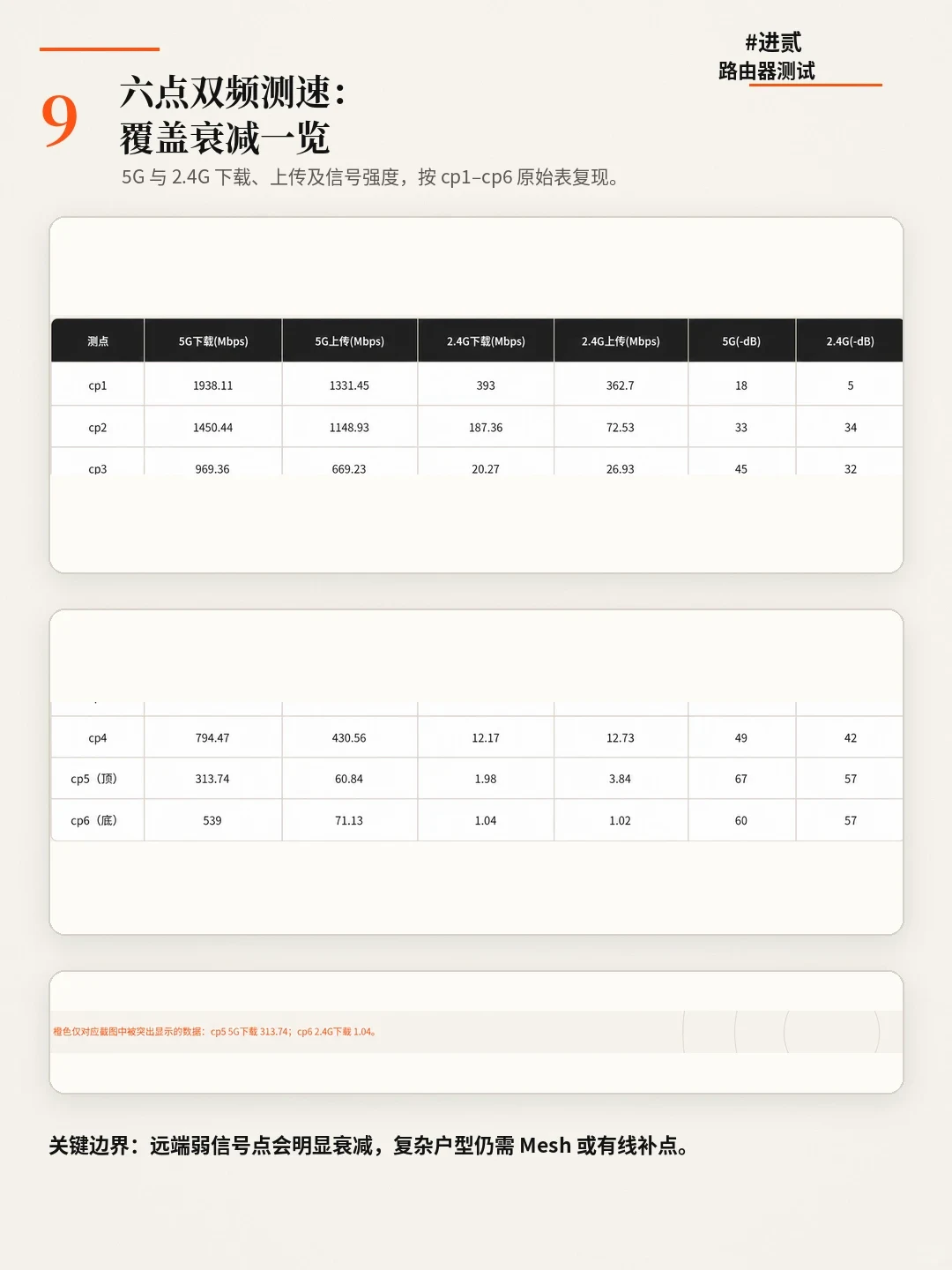
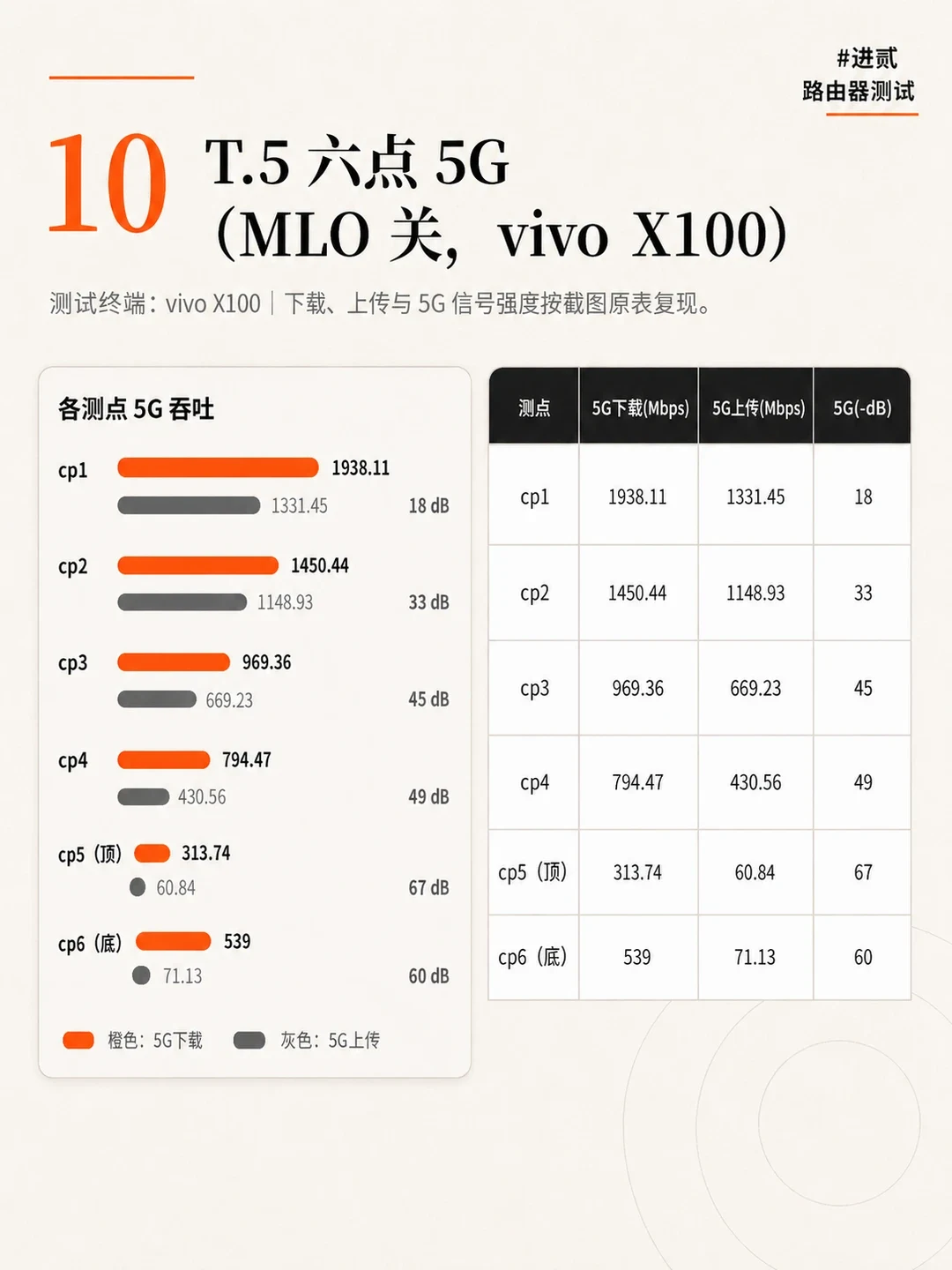
But it isn’t a wall-punching champion: at the weakest test point, 5 GHz download speed was only a little over 300 Mbps.
With MLO enabled, some locations improved by about 28%–48%. It didn’t help in every room, though, and switching it on won’t instantly give the whole home a strong signal.
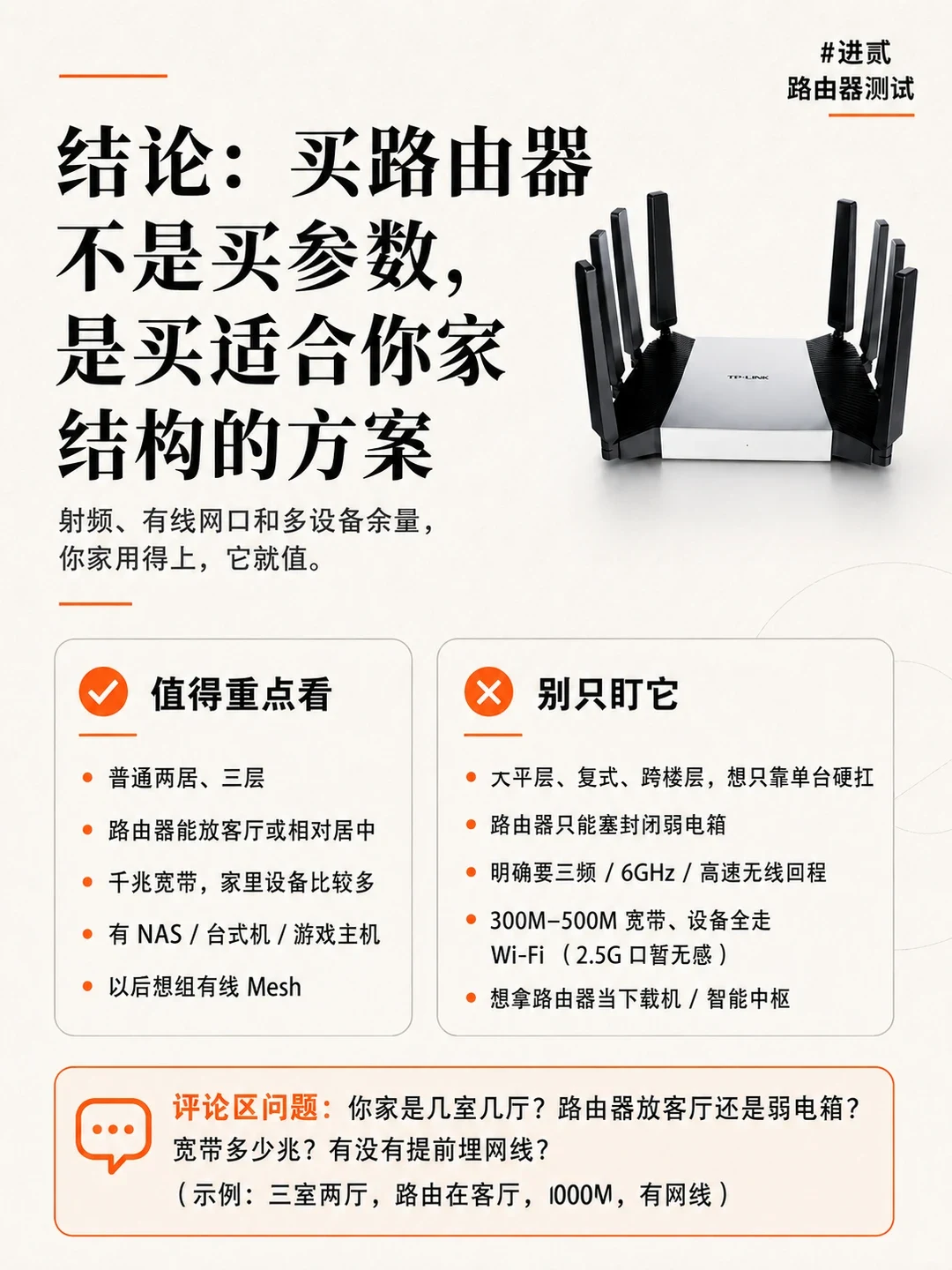
It’s a better fit for a typical one- to three-bedroom home where the router can sit in a fairly central spot, especially if the household has many devices or needs NAS, computer, or 2.5G wired connections.
For a large, open-plan home, a duplex, or a home with multiple floors, don’t expect one router to cover everything. Consider wired mesh or an access-point system instead.
Choosing a router isn’t about the flashiest specification sheet; it’s about whether the router suits your home’s layout and wiring.
Leave your home layout, broadband speed, router location, and budget in the comments, and I’ll help you think through whether a single router, mesh, or access points make sense.
Source: 进贰 · Xiaohongshu · 2026-07-08 · 【测完怎么样 】TPLINK 7DR7299,5百值不值. Search this Chinese title in Xiaohongshu to find the original post.
Before You Buy
Models in your region
The source author tested the mainland China TP-Link TL-7DR7290. TP-Link’s US and UK Archer BE550 are different, similar products—not regional relabels of the TL-7DR7290—so the Chinese router’s test results should not be treated as BE550 performance results.
| Model in this review | Related regional model | What to know |
|---|---|---|
| TP-Link TL-7DR7290 | TP-Link TL-7DR7290 (Mainland China) | This is the mainland China model tested in the source account. TP-Link lists it as dual-band BE7200 with four 2.5GbE and four Gigabit adaptive WAN/LAN ports; its features and services are designed for mainland China, and availability abroad is not promised. |
| TP-Link TL-7DR7290 | TP-Link Archer BE550 (US) | A similar US-market Wi-Fi 7 router, not a regional version of the TL-7DR7290. It is tri-band BE9300 with 6 GHz and five 2.5GbE ports, so the TL-7DR7290’s measurements do not establish its performance. |
| TP-Link TL-7DR7290 | TP-Link Archer BE550 (UK) | A similar UK-market model, not a regional version of the TL-7DR7290. It is tri-band BE9300 with 6 GHz and five 2.5GbE ports; check the country and hardware revision when considering availability or compatibility. |
- Model in this review
- TP-Link TL-7DR7290
- Related regional model
- TP-Link TL-7DR7290 (Mainland China)
- What to know
- This is the mainland China model tested in the source account. TP-Link lists it as dual-band BE7200 with four 2.5GbE and four Gigabit adaptive WAN/LAN ports; its features and services are designed for mainland China, and availability abroad is not promised.
- Model in this review
- TP-Link TL-7DR7290
- Related regional model
- TP-Link Archer BE550 (US)
- What to know
- A similar US-market Wi-Fi 7 router, not a regional version of the TL-7DR7290. It is tri-band BE9300 with 6 GHz and five 2.5GbE ports, so the TL-7DR7290’s measurements do not establish its performance.
- Model in this review
- TP-Link TL-7DR7290
- Related regional model
- TP-Link Archer BE550 (UK)
- What to know
- A similar UK-market model, not a regional version of the TL-7DR7290. It is tri-band BE9300 with 6 GHz and five 2.5GbE ports; check the country and hardware revision when considering availability or compatibility.
Choose the router for your layout and wiring
The TL-7DR7290 is a dual-band Wi-Fi 7 router without 6 GHz, with four 2.5GbE and four Gigabit adaptive WAN/LAN ports. That mix is useful if you need several faster wired connections for a NAS, computer, game console, or wired mesh setup. TP-Link’s listing identifies the mainland China model and warns that its features and services are designed for that market; overseas availability is not guaranteed.
For larger homes or multi-floor layouts, plan for coverage rather than assuming one high-performance router will reach everywhere. The author recommends considering wired mesh or access points in those cases; the weakest point in this test also showed why edge-of-home speeds can matter.
Treat the test speeds as setup-specific
The TL-7DR7290 reached about 2,366 Mbps on a phone at extremely close range, while three devices averaged about 1,730 Mbps in downloads at near-to-medium range. At the weakest test point, 5 GHz downloads fell to just over 300 Mbps. These results describe the author’s test locations and setup, not a guaranteed speed in another home.
MLO improved speeds by about 28%–48% at some test locations, but not every room benefited. That makes it worth treating MLO as a possible improvement in a particular setup, not a substitute for good router placement or additional access points.
Place it where it can ventilate
Avoid putting the TL-7DR7290 in a sealed wiring cabinet alongside a modem and power supply. The author’s teardown showed shielding and heat-dissipation structures around the main, wireless, and switching areas, but that observation does not establish a safe enclosure temperature or a universal thermal limit. A ventilated, relatively central spot—such as a living room or study—is the placement the author recommends.
What the 62-device test does—and does not—show
In the author’s simultaneous 62-phone test, packet loss was about 0.02%, average latency was 4.43 ms, and maximum latency reached 209 ms. The average and maximum describe different parts of the result: the low average does not mean every device stayed below 4.43 ms. Treat the figures as evidence from that test setup, not a general guarantee for every household network.
Do not confuse the Archer BE550 with the tested router
The US and UK Archer BE550 are similar TP-Link Wi-Fi 7 products, but neither is a regional relabel of the TL-7DR7290. Both are listed as tri-band BE9300 models with 6 GHz and five 2.5GbE ports, compared with the TL-7DR7290’s dual-band configuration and four 2.5GbE ports. The source’s speed, coverage, and load-test results therefore apply to the TL-7DR7290, not the BE550.
If you are buying outside mainland China, check the exact local model, hardware revision, feature availability, and support conditions. TP-Link says the TL-7DR7290’s features and services are designed for mainland China and are not guaranteed to be available abroad; the supplied evidence does not establish overseas service or support for that model.
Related Reading

Reviews & Guides · Computing & Networking
TP-Link TL-7DR7290 and TL-7DR7270 wired mesh: coverage across two floors
I use two wired TP-Link routers as access points, with a TL-R5005PE-AC as the main router. Coverage is strong except in awkward corners, and my phone switches as I walk between floors.
Reviews & Guides · Computing & Networking
TP-Link TL-7DR7290: 610 Mbps at the closed-door bathroom corner
I tested one TP-Link TL-7DR7290 on a 500 Mbps China Unicom line with every room door shut; my bathroom-corner speed test reached 610 Mbps.
Reviews & Guides · Computing & Networking
TP-Link TL-7DR7290: smoother door-camera video, but noticeable heat
I replaced my Xiaomi mesh setup with a TP-Link TL-7DR7290 system. My door camera stopped buffering, but the main router felt very hot.